AI voice over video generator.
30+ voices.
No recording needed.
Add voice over to videos from text. Write a script, pick a voice, and generate audio that lands directly in your video editor. Sign in to generate before doing so; voiceover generation uses credits and requires an active paid Satura plan.
Generated voiceover — James (Narrative)
00:00 / 01:24 · American · Deep & authoritative
Narrative
Documentaries, explainers, storytelling
Conversational
Vlogs, casual videos, tutorials
Energetic
Shorts, promos, hype content
Calm
Meditation, ASMR, ambient content
Find your voice
Browse the public voice samples and preview them live. Write or paste your script, review the credit estimate, and generate from the Voiceover workspace after sign-in.
Aria
CalmSmooth & relaxed · Australian
Callum
NarrativeDeep & authoritative · British
Charlie
ConversationalWarm & natural · American
Charlotte
StorytellingExpressive & clear · British
George
DocumentaryCinematic & rich · British
Laura
PromotionalConfident & polished · European
Liam
EnergeticUpbeat & dynamic · American
River
EducationalMeasured & articulate · American
Roger
NarrationWarm & steady · American
Sarah
ConversationalFriendly & engaging · American
+ more voices available in the editor
Aria
Calm · Australian · Female
Voiceover workspace
After sign-in, write or paste your script, select a voice, and review the credit estimate before generation. Voiceover generation requires an active paid Satura plan and credits.
Review the generated audio in the editor before adding it to an edit or export.
Video voice over
Add voice over to videos without recording
If you need to voice over videos, Satura turns your script into natural audio and keeps the full editing workflow in one place. Generate the narration, place it on the timeline, trim it, and export the final video.
Use it for YouTube videos, Shorts, tutorials, product demos, faceless channels, ads, and social clips when recording a human voice is too slow or expensive.
Add voice over to a video
Generate narration from text and place it on the same timeline as your clips, subtitles, music, and effects.
Text to speech for video
Turn scripts, hooks, tutorials, and product copy into voiceovers for videos without recording your own audio.
Create video voice over from a script
Paste a finished script, preview public samples, and generate a voiceover for explainers, tutorials, ads, or demos.
Voice over YouTube Shorts
Turn short scripts into punchy narration, then pair the audio with captions to keep viewers watching.
Narrate faceless videos
Build documentary, history, finance, education, or list-style videos without recording your own voice.
Professional voiceovers, zero equipment
Everything you need to add voice narration to any video — built into the same editor where you build the rest of your content.
30+ voices to explore
Browse public samples first, then choose from the available voice options in the workspace before requesting a generation.
Multiple accents
Public samples span several accents and styles. Check the workspace for the voice options available to your account when you are ready to generate.
Voiceover generation
Paste your script and choose a voice. Processing time can vary with the script, provider processing, and queue before the audio is added to your timeline.
Directly in the editor
Generated audio appears as a timeline asset. Position, trim, loop, and mix it with the other audio and video in your project.
Layer with anything
Layer a voiceover with video, subtitles, background music, sound effects, and text on the same timeline, then review the finished edit.
Script-based generation
Use a complete script and clear punctuation to communicate the intended delivery, then review the generated audio before adding it to your project.
How to add voiceover to a video from text
The Voiceover Studio isn't a standalone audio generator — it's part of a complete video creation workflow. Generate a voiceover, and it appears on your editor timeline alongside video clips, subtitles, images, and music. Everything you need to build a finished video is in one place.
This is especially powerful for faceless channels and educational content. Write your script, generate narration in the voice of your choice, pair it with AI-generated video or images, add captions with Quick Subtitles, and export. The entire pipeline — from blank page to published video — happens inside Satura.
No recording, no editing in Audacity, no importing audio files into a separate video editor. One workspace. One workflow. Done.
Open Voiceover Studio
Sign in to Satura and open the Voiceover Studio panel in the editor.
Write a script and select a voice
Write or paste your narration in the workspace and select an available voice for the request.
Review the credit estimate
Voiceover generation requires an active paid Satura plan and credits; review the current estimate before confirming.
Place it under your video
Trim, position, loop, and mix the voiceover with video clips, music, subtitles, and effects.
Export the finished video
Add captions if needed, review timing, and export the video with voiceover from one browser workspace.
Built for every content format
Faceless YouTube channels
Create a narration track from a script when you do not plan to record your own voice, then review the complete edit and publishing rights before release.
Explainer & tutorial videos
Create a narrated draft for walkthroughs, product demos, and educational videos, then adjust the timing alongside the visuals on the timeline.
YouTube Shorts narration
Add voiceover narration to Shorts, then pair it with subtitles for a mobile-readable video workflow.
Podcast clips & audiograms
Turn written highlights into voiced audio clips. Generate the voiceover, add a waveform visual or background video, and share as social content.
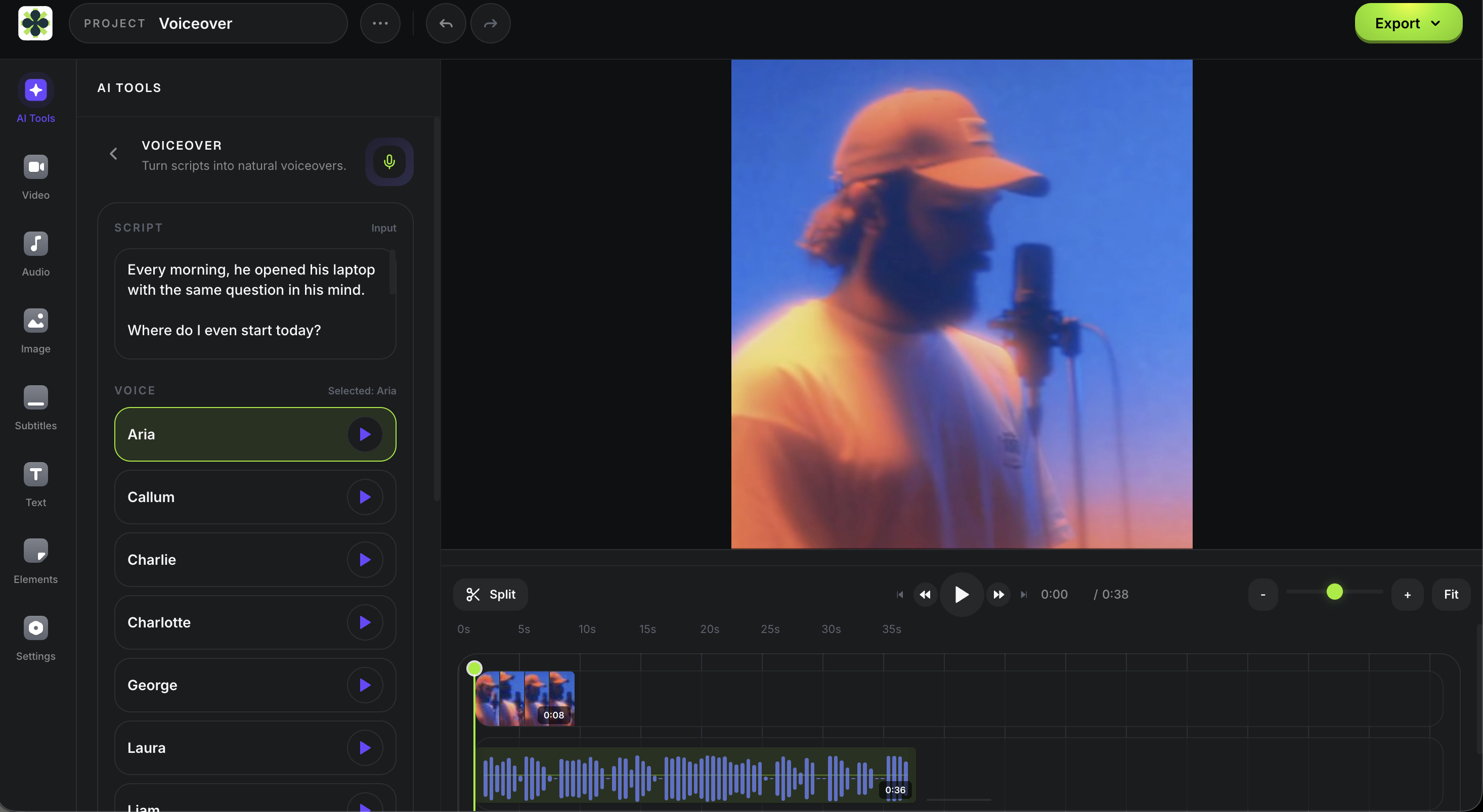
Write, generate, edit —
all in one place
The Voiceover Studio panel sits right next to your video timeline. Write your script, browse voice previews, generate audio, and drag it into position. Adjust timing with the same precision you'd use for any audio track.
- Voice browser with instant audio previews
- Script editor with character count and cost estimate
- One-click generation with timeline placement
- Trim, loop, and volume control on the timeline
- Export with video, subtitles, and music in one file
Frequently asked questions
More tools for creators
AI Voiceovers work best alongside Satura's full creative toolkit — from video generation to subtitles to analytics.
Add Audio to Video
Import existing music, narration, or effects and mix them on the video timeline.
YouTube Voiceover Generator
Create AI narration for YouTube videos, Shorts, tutorials, and faceless channels.
Free AI Voiceover Tools
Compare free AI voiceover workflows, commercial-use checks, and editing handoffs for faceless YouTube.
YouTube Narration Brief Template
Prepare an approved script, delivery direction, pronunciation checks, and the next audio review before entering the workspace.
YouTube Audio Review Template
After placing approved narration in a timeline, record dialogue, music, effects, source notes, and the next accountable audio action before final export.
AI Video Generator
In the signed-in paid workspace, review current model inputs, settings, and a credit estimate for authorized material, then inspect the completed draft.
AI Image Generator
Use an authorized visual brief in the active paid workspace, choose a supported ratio, then inspect the generated PNG draft before using it.
Quick Subtitles
Choose a source video in the signed-in paid workspace, review a credit estimate, then inspect the generated caption draft before export.
AutoClip
Start a permitted source session on an active paid plan, review suggested clips, then confirm the 30-credit download quote for a rendered clip.
Trustscore
Connect a YouTube channel you own for Satura's proprietary 0-100 diagnostic, then review its data-confidence label and measured inputs before deciding what to test.
Background Remover
Select one video clip in the signed-in paid editor, review the credit estimate, then inspect the generated result before compositing or export.
Your voice. Your script. No mic required.
Write your script, generate the voiceover, then review the audio in your editor before publishing. Generation uses credits and requires an active paid plan.
Open Voiceover workspace