Transcribe video to text
with word-level timestamps.
After sign-in, add or select a permitted video or audio source in the editor, review the credit estimate, and create a transcript for review in your edit. Available source and output options depend on the selected media.
Transcription uses credits and requires an active paid Satura plan. Credit estimates vary by source duration.
Sign in
Workspace access
Source
Add or select
Quote
Review credits
Review
Inspect draft
Video to text transcription
Transcribe video to text, then use the transcript in your edit
In the signed-in workspace, choose or add a permitted source, review the current credit estimate, then inspect the returned transcript and timing context before using the source's available subtitle, edit, or export options.
Choose a permitted source
After sign-in, add or select the video or audio source you are allowed to use in the Transcript panel.
Review the credit estimate
Check the current quote for the selected source before you confirm a transcription request on an active paid Satura plan.
Inspect the returned draft
Review transcript text, segment context, and any available word timing. Names, numbers, claims, and technical terms need human review.
Choose a supported handoff
Use the selected source's available subtitle, edit, or export options only after the transcript has been reviewed in context.
Source
A permitted video or audio source selected in the signed-in workspace
Confirm the source and intended use before processing.
Estimate
A current transcription credit quote for the selected source
Confirm the paid-plan and credit context before you submit.
Transcript
Returned text with available segments and word timing
Inspect wording, timing, names, numbers, and context.
Handoff
Available subtitle, editor, or export options for the source
Choose one next action rather than treating a draft as publication-ready.
See it in action
This is a sample transcript preview. After sign-in, add or select a video or audio source in the editor, review the credit estimate, and start transcription from the workspace. Transcription requires an active paid Satura plan and credits.
Source video or audio
Choose the source inside the transcription workspace
The biggest mistake creators make is treating every video the same way.
Your Shorts need a completely different hook structure than long-form.
In the first second — literally one second — you either keep them or lose them.
So what I started doing was writing my hook separately from the script.
I'd test three or four opening lines and pick the one that felt most urgent.
That one change doubled my average view duration in about two weeks.
And once your retention goes up, everything else follows — the algorithm sees it.
How to use the transcription tool
The source, quote, transcript review, and next handoff belong in the same accountable workflow.
Open the transcription workspace
Sign in to Satura and open the Transcript panel in the editor.
Add or select a permitted source
Choose a video or audio source in the workspace, then review the credit estimate before starting transcription.
Review the transcript in your edit
Review the transcript and timing, then use the workspace options available for subtitles, edits, or export.
Transcripts unlock more than subtitles
A transcript is a draft production input. Review it in context before using it for captions, notes, editing, or another approved workflow.
Review a transcript as project context
Keep spoken context available for an editor, producer, or subject-matter reviewer before turning it into another approved production input.
Prepare a caption handoff
Review returned transcript and timing context, then use the available caption workflow only after the wording and viewer context have been checked.
Locate a moment for review
Use transcript text and any returned timing details to discuss a moment in a selected source before an editor or reviewer chooses the next action.
Prepare repurposing notes
Use a reviewed transcript as source context for a separate writing, caption, or production brief rather than treating raw text as a final publication.
Collect follow-up questions
Mark names, claims, technical terms, or unclear passages that need a responsible reviewer before the transcript is handed to another workflow.
Organize lesson or interview notes
Use a reviewed transcript as a starting point for notes, learning materials, or an editorial outline when you have the right to use the source.
Built around source, quote, and review
Signed-in workspace
Open the Transcript panel after sign-in and choose or add a permitted source before any processing starts.
Quoted processing
Review the current credit estimate for the selected source before submitting a transcription request.
Language setting
Set a language when the workspace provides that control, or keep the available automatic setting for the request.
File or safe HTTPS source
The protected route accepts a selected file or safe HTTPS source under its current size and account controls.
Transcript and timing result
Inspect returned transcript text and any available segment or word timing before using it in another workflow.
Editor handoff
Continue only with the subtitle, edit, or export options that are available for the selected source in the workspace.
Treat a transcript as
a reviewable production input.
A transcript can give an editor or reviewer a useful text representation of permitted source media. It does not establish that every word, timing detail, claim, or name is ready to reuse without inspection.
Review the result against the source, then carry only the relevant context into the next approved task: a caption draft, edit note, writing brief, or source discussion.
Rights, permissions, privacy, disclosure, factual accuracy, and publication decisions remain with the responsible person. A transcript is not a clearance or publishing decision.
Source context
Keep the selected source and intended use visible for the reviewer
Wording review
Check names, numbers, claims, and technical language against the source
Timing context
Inspect available segment and word timing before a time-sensitive handoff
Caption review
Carry a reviewed draft into the separate caption workflow when it is available
Edit notes
Prepare source-grounded notes for a timeline or production decision
Next action
Keep the responsible editor, reviewer, or exporter attached to the open question
Review your transcript handoff
Keep the returned draft and the available next action clear before you move the selected source into another workflow.
Inspect the returned text against the source and keep unresolved wording or timing questions visible.
Use only the subtitle, edit, or export options available for the selected source after review.
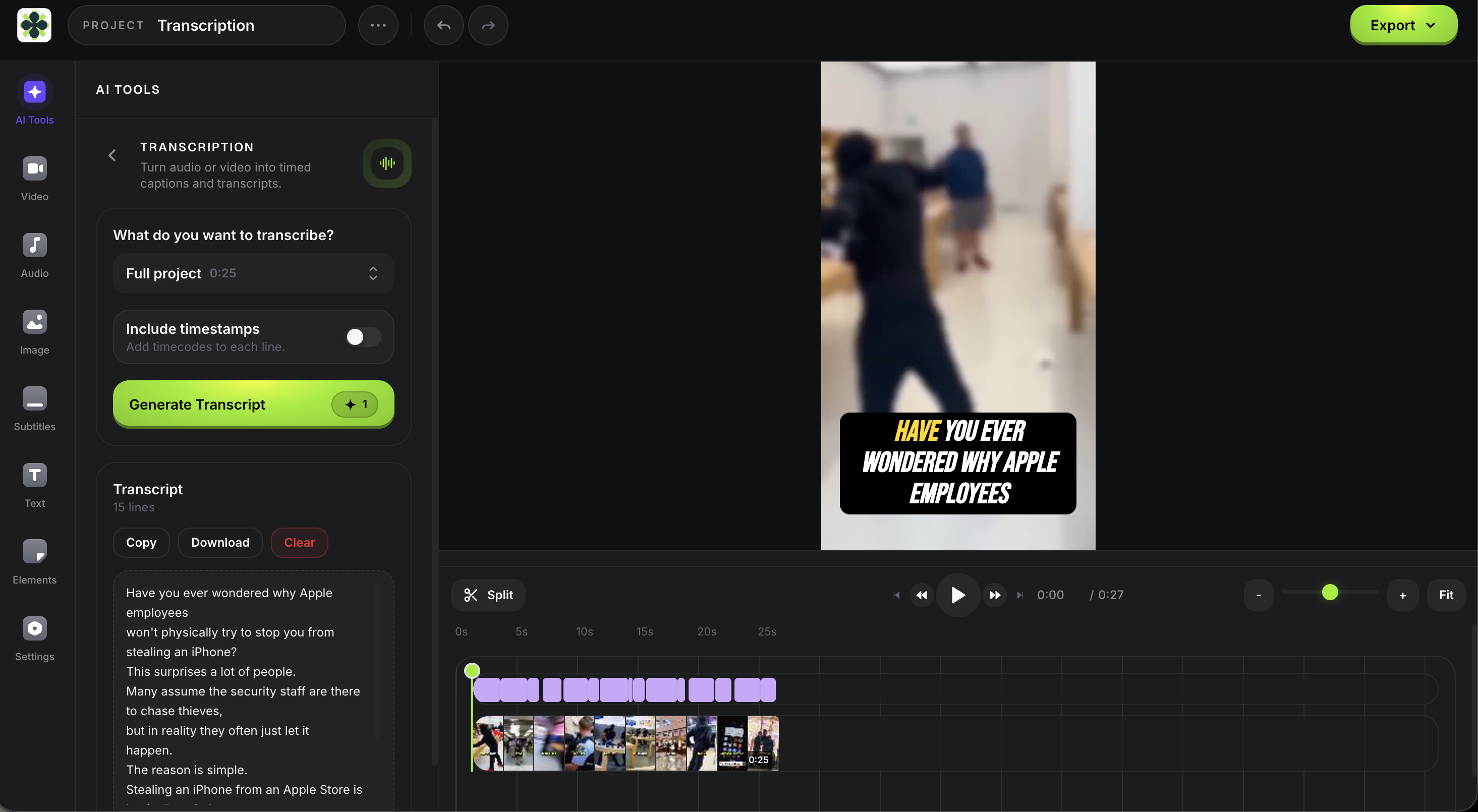
Transcribe, review, hand off —
one accountable sequence
Transcription starts in the same signed-in workspace where you build videos. Choose or add a permitted source, review the current credit estimate, inspect the returned draft, then select an available next action for that source.
- Source selection and credit review before processing
- Returned transcript and timing context for review
- Names, numbers, claims, and technical terms checked in context
- Subtitle, editor, or export options limited to what the workspace provides
- One accountable next action before the source moves forward
Frequently asked questions
More tools for creators
Transcription is one piece. Subtitle, clip, generate, and grow with the rest of Satura.
Soz AI Alternative
Compare SozAI transcript exports with Satura's YouTube transcription and permitted import workflow.
Quick Subtitles
Choose a source video in the signed-in paid workspace, review a credit estimate, then inspect the generated caption draft before export.
YouTube Caption Review Template
Carry a caption draft into accuracy, timing, viewer-context, and next-handoff review before publishing.
AI Voiceovers
Sign in to preview current voices, review the paid-plan credit estimate, then inspect generated audio in the editor before continuing.
AutoClip
Start a permitted source session on an active paid plan, review suggested clips, then confirm the 30-credit download quote for a rendered clip.
AI Video Generator
In the signed-in paid workspace, review current model inputs, settings, and a credit estimate for authorized material, then inspect the completed draft.
Trustscore
Connect a YouTube channel you own for Satura's proprietary 0-100 diagnostic, then review its data-confidence label and measured inputs before deciding what to test.
AI Growth Coach
Sign in, connect and select a YouTube channel, then use available context to frame one focused coaching question and next-upload test.
Turn a permitted source into a reviewable transcript.
Sign in, review the current credit estimate, inspect the returned draft, and choose the next available subtitle, edit, or export handoff in the workspace.
Open Transcription workspace