SozAI vs Satura

Soz AI alternative for YouTube transcripts, clips, and edits.

SozAI is built around transcription and written exports. Satura is the broader creator workflow when a transcript must become searchable moments, captions, clips, timeline edits, and a finished YouTube video.

Product facts reviewed August 3, 2026. Verify current features and limits before choosing.

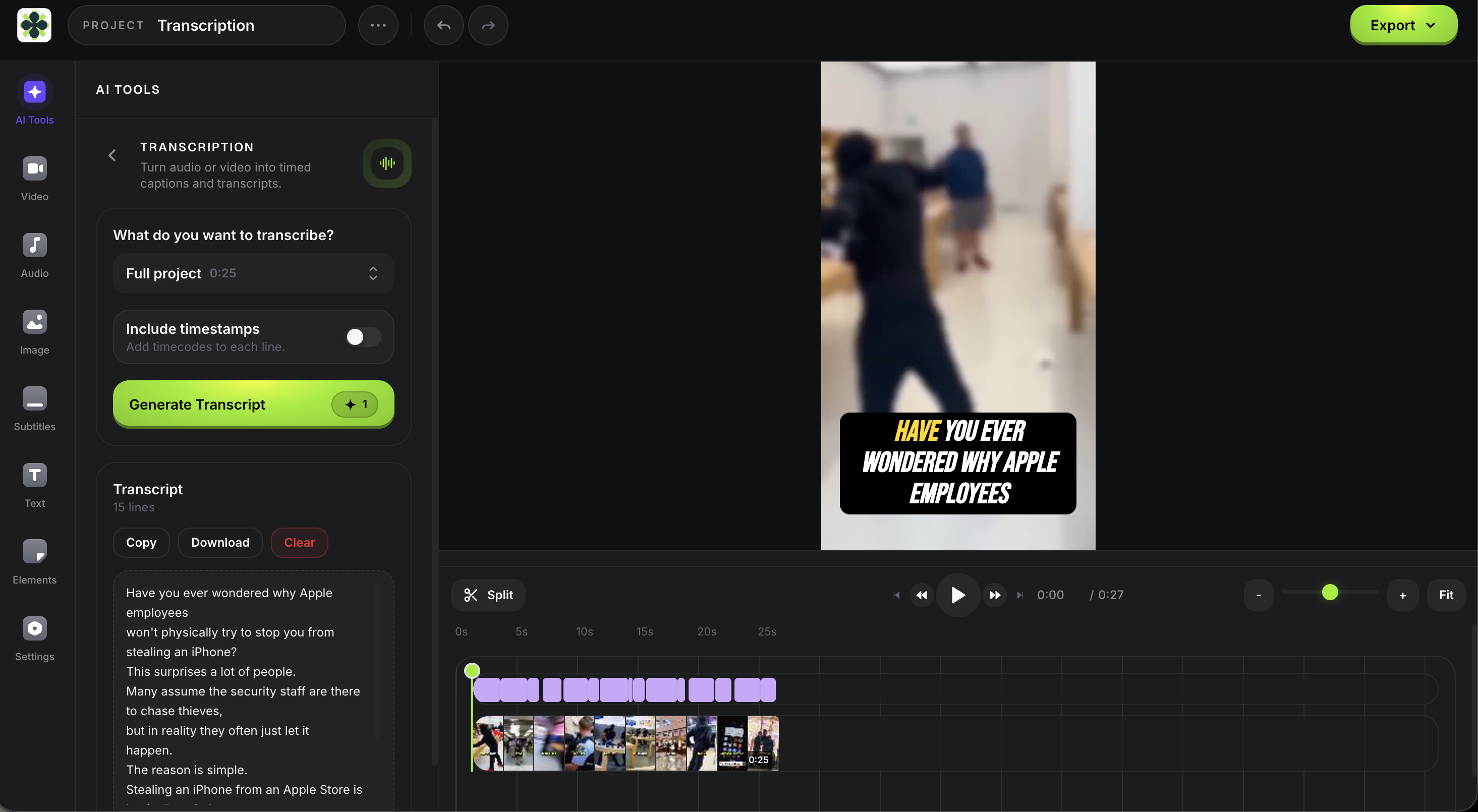
Satura transcription panel for reviewing a YouTube transcript inside the video editor

Direct answer

A transcript download is not a video download.

Based on SozAI's official pages reviewed August 3, 2026, its YouTube workflow accepts a URL and returns searchable text, timestamps, summaries, and transcript or subtitle exports. Those pages do not document downloading the original source video file.

SearchWhat the output meansBest route
Söz AI YouTube downloaderSozAI's official pages document pasting a YouTube URL and downloading the resulting transcript or subtitle file. They do not document downloading the original source video file.Use SozAI for text. Use Satura's separate import workflow only for video you own or have permission to reuse.
Soz AI YouTube transcriptPaste a YouTube URL, generate searchable text with timestamps, then export a transcript or subtitle format documented by SozAI.Choose based on whether the deliverable stops at text or continues into clips, captions, and a finished edit.
Download and edit a YouTube videoThis is a source-video workflow rather than a transcript workflow. Rights and YouTube's terms still apply to every import.Use Satura only for your own uploads, licensed media, client-approved assets, or other permitted content.
Find a quote or timestampA transcript can make a known video searchable. A clip finder is more useful when you need to search across indexed video moments.Use Satura Transcription for one source or Clip Finder when discovery across videos is the larger job.

Choose SozAI when

  • The main deliverable is a transcript, meeting note, summary, subtitle file, or searchable text archive.
  • You need a transcription-focused web or app workflow without a broader video production system.
  • Speaker labels, document exports, and text review matter more than timeline editing or channel analytics.
  • You are evaluating one known YouTube source and do not need to import the original video into an editor.

Choose Satura when

  • The transcript needs to become captions, clips, voiceover, a timeline edit, or a finished YouTube upload.
  • You need to search moments, repurpose owned footage, and keep the source connected to the editor.
  • Thumbnails, metadata, CTR, retention, RPM, and channel diagnostics belong in the same operating loop.
  • You have the rights to import the source video and want more than a transcript file.

SozAI vs Satura

Compare the deliverable, then compare the tool.

Both products can begin with spoken content. The practical difference is whether the approved transcript ends the job or continues into a video production and performance workflow.

DecisionSozAISaturaBottom line
Primary jobTurn audio, video, meetings, lectures, podcasts, and YouTube links into searchable text.Carry creator media through transcription, clip discovery, captions, editing, packaging, and YouTube analysis.Choose SozAI when the transcript is the deliverable. Choose Satura when the transcript starts a production workflow.
YouTube URL inputIts official YouTube page describes pasting a URL and processing the audio into a timestamped transcript.Can transcribe a YouTube link or import an owned or permitted video into an editing timeline.The same URL can lead to different outputs, so define whether you need text, a source asset, or a finished edit first.
Downloads and exportsDocuments transcript and subtitle exports such as text, document, SRT, VTT, and structured formats.Exports transcript text, captioned edits, clips, and finished video from creator workflows.Do not treat transcript export as proof of source-video download support. Verify the exact output before choosing.
Transcription depthEmphasizes broad language support, speaker identification, timestamps, summaries, and searchable text.Emphasizes word-level timing that can become subtitles, searchable moments, repurposing text, and timeline edits.Test the same difficult source in both and compare correction time, timing quality, speaker handling, and export fit.
Video editingIts public product positioning centers on transcription, notes, summaries, and subtitle files.Adds a browser timeline, trimming, layers, voiceover, generated media, captions, resizing, and finished exports.Choose Satura when transcript corrections must remain connected to the final video timeline.
Clip discoverySearches within generated transcripts and uses timestamps to navigate a known source.Adds Clip Finder and AutoClip for finding moments, creating short-form cuts, and continuing into editing.Known-source search and cross-video discovery are different jobs; test the one your team actually repeats.
After publishingThe documented workflow focuses on turning spoken content into text and related written outputs.Connects production to thumbnails, metadata, CTR, retention, RPM, TrustScore, and channel coaching.Satura fits teams that want performance evidence to influence the next transcript, script, edit, and upload.

Where SozAI is strong

A focused transcription product may be enough.

SozAI should stay on the shortlist when audio-to-text is the actual job. These strengths are based on its current official product pages, not a claim that both platforms serve identical needs.

A focused audio, video, meeting, lecture, and YouTube transcription workflow
YouTube URL input with timestamped transcript, subtitle, and text export options
Speaker identification, summaries, searchable text, and broad language support
Web and app availability for users who need transcription away from a video editor

Verify limits, rights, and data handling.

Transcription limits and source-video rights are different checks. Confirm current plan allowances, test the actual audio, and only import video you are authorized to reuse.

Separate transcript download from source-video download: the official pages document exporting text and subtitle files, not downloading the original YouTube video file.
Verify the current free allowance in the product because SozAI public pages use different wording for free YouTube transcripts and monthly transcription minutes.
Test accuracy with your own accents, names, music, overlapping speakers, and background noise instead of relying only on a headline accuracy claim.
Review the current privacy policy for your exact workflow because uploaded recordings, account data, and on-device voice translation can follow different processing rules.

Evaluation workflow

Test one real source from URL to deliverable.

01

Define the output

Write down whether you need text, subtitles, a downloaded source, a timestamp, a clip, or a finished edit. These are not interchangeable outputs.

02

Test one difficult source

Use the same video with names, accents, music, or multiple speakers and measure correction time, not only first-pass speed.

03

Finish the real workflow

Export the format your team actually uses, then include caption cleanup, clip selection, editing, and publishing handoffs in the comparison.

Soz AI alternative FAQ

Questions before choosing a workflow.

Is Soz AI a YouTube downloader?

SozAI's official pages describe pasting a YouTube URL to generate and download a transcript or subtitle file. They do not document downloading the original YouTube source video. Treat SozAI as a transcription product unless its current official documentation says otherwise.

What does the Söz AI YouTube downloader search usually mean?

It commonly reflects transcript-download intent: the user wants to paste a YouTube link, extract the spoken text, and save that text as a transcript or subtitle file. If the required output is the original video file, that is a separate workflow with rights and platform-rule implications.

What is the best Soz AI alternative for YouTube creators?

Satura is a strong Soz AI alternative when a YouTube transcript needs to continue into clip discovery, word-timed captions, timeline editing, thumbnails, metadata, CTR, retention, RPM, or channel diagnostics. SozAI remains a focused option when transcription and written exports are the complete job.

Can Satura transcribe a YouTube video?

Yes. Satura can turn a YouTube link, video file, or audio file into editable text with word-level timestamps, then use the transcript for search, captions, clips, notes, repurposing, or editing.

Can Satura download and edit a YouTube video?

Satura can import and edit YouTube videos you own, manage for a client, license, or otherwise have permission to reuse. Do not use the workflow to download or repost third-party content without permission, and follow YouTube's terms and the rights holder's rules.

How should I compare SozAI and Satura transcription quality?

Run the same representative source through both tools. Compare word accuracy, names, punctuation, speaker changes, timestamps, correction time, supported export formats, and what happens after the transcript is approved. Verify current plan limits before paying because product allowances can change.

Turn the transcript into a finished creator workflow.

Start with one video or audio source, review the words and timestamps, then continue into searchable moments, captions, clips, timeline edits, and export.

Open AI Transcription