YouTube voiceover generator for videos, Shorts, and faceless channels.
Write the script, generate AI narration, place it on your timeline, and continue with captions and editing in the same browser workspace.
Voiceover generation requires sign-in, an active paid Satura plan, and credits. Review the generated audio before publishing or exporting.
Use cases
Voiceovers matched to YouTube formats
The best YouTube voiceover tool does more than create audio. It needs to fit the format you are making and keep the edit, captions, and visuals connected.
YouTube Shorts narration
Turn a short hook and punchline into narration, then add captions and export a vertical video from the same timeline.
Faceless channel videos
Create documentary, list, finance, history, or education narration without recording your own voice.
Tutorials and explainers
Paste a step-by-step script and generate a calm voiceover for walkthroughs, demos, lessons, and product videos.
YouTube automation
Move from topic research to script, voiceover, visuals, subtitles, and export without leaving the browser.
From script to voiced YouTube edit
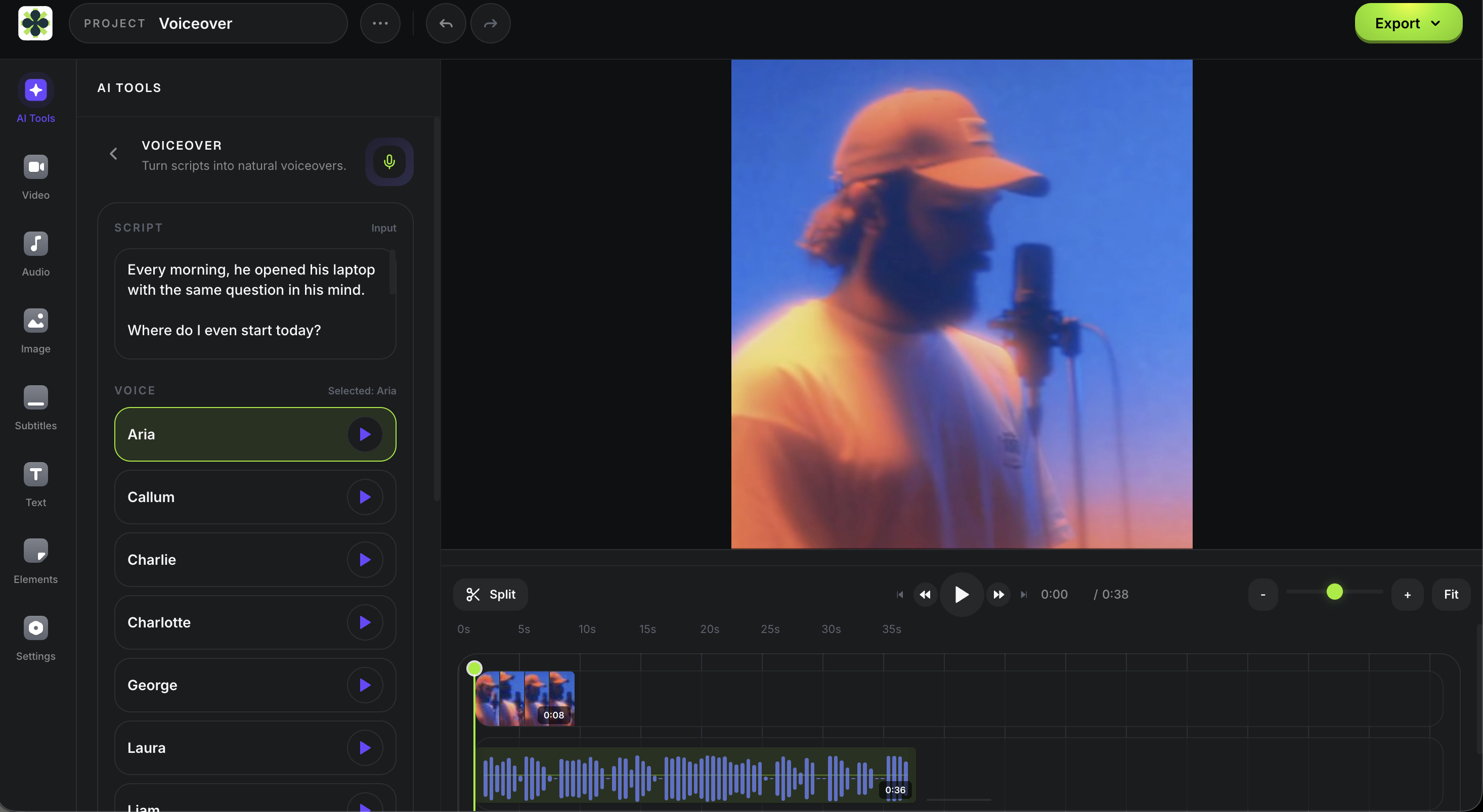
Generate narration inside the same place where you cut clips, add captions, build scenes, and prepare the final export.
Paste the YouTube script
Use a Shorts hook, long-form outline, tutorial script, or faceless channel narration.
Choose a voice style
Pick narrative, conversational, energetic, calm, documentary, or educational delivery.
Generate the voiceover
Submit the script and selected voice, then review the generated audio in your project when processing finishes.
Add subtitles and visuals
Layer captions, AI video, images, B-roll, music, and final edits in the same workspace.
Build the rest of the video around the voiceover
A YouTube voiceover is usually the spine of the edit. Use these connected Satura tools to turn the narration into a finished upload.
AI Voiceovers
Open the full Voiceover Studio feature page with voices, editor workflow, and FAQ.
Free AI Voiceover Tools
Compare free voiceover workflows, commercial-use checks, and what to test before publishing.
YouTube Automation
Plan a faceless YouTube workflow from research and script to voiceover and export.
Quick Subtitles
Add word-timed captions after generating the YouTube voiceover.
AI Video Generator
Generate visuals to pair with voiceover narration.
No mic, booth, or separate audio editor.
Satura keeps the YouTube narration and the video edit together, so you can regenerate, trim, caption, and export without managing audio files.
Voiceover generation uses credits and requires an active paid Satura plan. Review the generated audio in context before publishing.
FAQ
Quick answers for creators comparing YouTube voiceover generators.
What is a YouTube voiceover generator?
A YouTube voiceover generator turns written scripts into narration for YouTube videos. In Satura, voiceover generation uses credits and requires an active paid plan; after processing, review the generated audio in the editor before you continue the edit or export.
Can I use Satura for faceless YouTube voiceovers?
Yes. Use Satura for a faceless YouTube workflow when you want to write a script, generate AI narration, and continue editing in the same project. Voiceover generation uses credits and requires an active paid Satura plan.
Does this work for YouTube Shorts?
Yes. You can generate narration for a Short, add it to a vertical project, then use Quick Subtitles for a caption workflow. Review timing, wording, and the completed edit before publishing.
Do I need recording equipment?
No. You can create YouTube narration from text without a microphone, recording booth, audio cleanup tool, or separate editor.
Can I use generated voiceovers commercially?
Review current Satura terms and any provider conditions relevant to your account, script, source material, and intended use before commercial publishing. Do not assume that access to the tool grants blanket commercial rights.
How do credits and access work?
Voiceover generation requires sign-in, an active paid Satura plan, and credits. Credit use is based on script length, so review the current plan and quote details before submitting a generation.
Create the voiceover where the video gets edited.
Sign in to generate narration, then review it with visuals, subtitles, and final edits in Satura.