Satura AI video editor with prompt-based edits.
The Satura AI video editor gives you a free browser timeline plus prompt controls. Describe the edit, cut by hand when precision matters, add AI subtitles and voiceovers, generate clips, transform shots, and export from the browser. Prompt-based AI edits and generated clips use credits and require an active paid Satura plan.
A free account includes one clean low- or medium-quality export per day, up to 10 per month. Paid plans add high and ultra quality plus more export capacity.
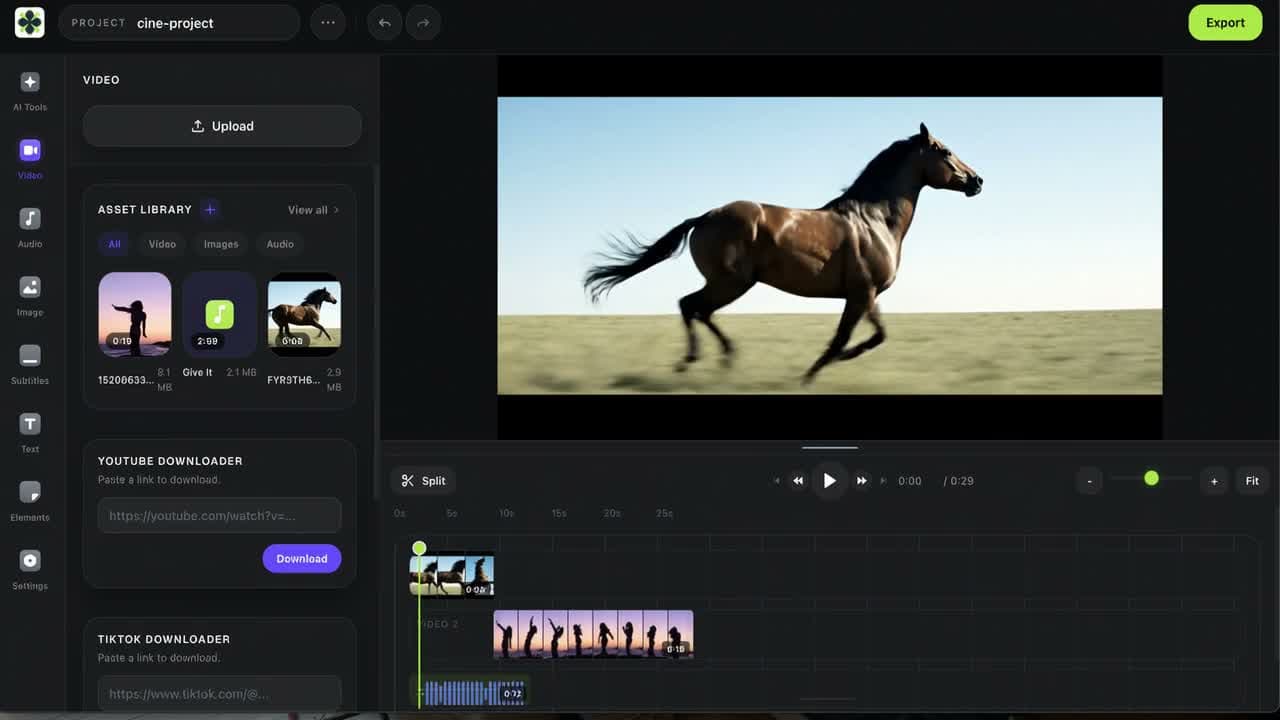
Edit on a real timeline
Trim, split, layer, keyframe, caption, and export from a multi-track editor built for finished videos.
Use AI where it helps
Generate clips, add subtitles, create voiceovers, remove backgrounds, and transform short clips without switching tools. AI work uses credits.
Export from the browser
A free account includes clean low- or medium-quality exports once per day, up to 10 per month, without installing another desktop app.
Prompt editing starts in the workspace.
Prompt edits are for a short source clip and a specific visual change. They require sign-in, an active paid Satura plan, and credits. Review the result with your captions, audio, and timeline before exporting.
Example edit instructions
- Change the background to a sunset beach
- Make the clip look like vintage film
- Add falling snow to the scene
- Turn daytime into nighttime
Prompt edit workflow
Review settings and credit use after sign-in
- 1Sign in and choose a short source clip you have the rights to edit.
- 2Review the currently supported model, input settings, and credit estimate.
- 3Describe the intended change, then review the generated result on the timeline.
What can you edit with Satura AI?
Satura AI is a browser-based video editing platform for creators who want a multi-track timeline alongside AI tools. Use it for YouTube videos, vertical Shorts, narrated explainers, and prompt-based clip revisions. Manual edits are available with a free account; AI tool access and credit requirements vary by workflow.
YouTube videos and tutorials
Cut your own recording, layer B-roll and text, adjust audio, and review captions before exporting a complete video.
Review this workflowYouTube Shorts, Reels, and TikTok
Arrange a vertical edit, check framing and caption readability, and preview the opening and final cut in context.
Review this workflowFaceless explainers with narration
Combine an original script, AI narration, and authorized or generated visuals on the timeline. Voice and video generation require a paid plan and credits.
Review this workflowPrompt-based changes to existing clips
Describe one visual change to a permitted short clip, review the model settings and credit quote, then inspect the generated draft alongside neighboring shots.
Review this workflowStill choosing an editor? The AI video editing buying guide compares browser timelines, transcript editing, social captions, clipping, and detailed finishing workflows.
Prompt editing
A text prompt video editor for clips you already have.
Start with a short clip you have the rights to edit, describe one visual change, and review the result in context. Prompt-based AI edits use credits and require an active paid Satura plan.
How to edit a video with prompts in Satura
Prompt editing works best when it is paired with timeline review. Use AI for the change, then use editor controls to make the final video precise.
Sign in and choose a source clip
Use a short source clip you own or are authorized to edit, then review the current workspace options.
Describe the edit in plain English
Write a prompt for the change you want, such as a new background, lighting pass, style, object, or generated insert. Prompt-based AI edits use credits and require an active paid Satura plan.
Review the AI result on the timeline
Place the result in context with your audio, captions, overlays, cuts, and neighboring shots before deciding what to keep.
Finish the video with manual controls
Trim, layer, caption, mix audio, add effects, and export the final video from the browser.
AI tools for video editing
The prompt editor is built into the timeline, not bolted on after.
Satura keeps prompt-based editing alongside the timeline, so you can inspect an AI result with your cuts, captions, and audio before exporting. Review the current input settings and credit quote for the tool you choose.
AI subtitles
Transcribe speech, style captions, and fine-tune timing inside the same editor.
AI voiceovers
Turn a script into narration and place it directly on your video timeline.
AI video generation
Generate new clips from prompts, then cut them into your project without downloading and re-importing.
Prompt-based AI video edits
Use AI to edit videos by describing changes like a new background, visual style, or lighting pass.
Background removal
Remove or replace backgrounds for product shots, Shorts, tutorials, and creator content.
AI images and thumbnails
Create supporting visuals, covers, and thumbnails without leaving Satura.
Pro control
AI video editing software should still feel like editing.
A prompt can help. A real editor finishes the job. Satura is a video AI editor for creators who still need timing, layers, captions, audio, motion, and export control.
- Multi-track video, audio, image, text, and shape editing
- AI tools for video editing built into the workspace
- WebGPU effects, blend modes, masks, and transitions
- Keyframe animation with graph and dopesheet controls
- Browser-based export for social, YouTube, and client work
Workflow
Use AI to edit videos, then finish them properly.
The point is not to replace creative judgment. It is to remove the slow steps so the final edit still feels intentional.
01
Bring in footage
Upload clips, images, audio, generated video, or assets from your Satura library.
02
Edit with timeline plus AI
Cut the story by hand, then use video editing AI for subtitles, voiceovers, backgrounds, generated clips, and visual changes.
03
Finish and export
Add polish, check the timeline, and export a finished video from the browser.
Choose your editing approach
When should you use manual edits, AI edits, or generation?
Choose the tool for the change you need, then review the finished video. A free Satura account includes low- or medium-quality exports once per day, up to 10 per month. Paid AI actions have separate credit requirements.
Manual timeline editing
Use cuts, layers, keyframes, and audio controls when exact timing and composition matter. Satura's browser timeline is available with a free account.
AI-assisted editing
Use available caption, voiceover, or prompt-based tools for a specific part of the edit, then inspect and revise the result on the timeline. Check access and the current credit quote before starting.
AI video generation
Create a new clip from supported text or image inputs, then assemble it with your other media. Generated clips require an active paid Satura plan and credits.
FAQ
Questions about Satura's AI video editor.
Explore more
Keep the whole video workflow in Satura.
AI Video Editing Buying Guide
Compare Satura, Descript, CapCut, OpusClip, and Premiere by workflow, then test editing control, captions, cost, and export requirements.
Free Video Editor
Use the signed-in browser timeline with one low- or medium-quality export per day, up to 10 per month, before paid AI work.
YouTube Video Editor
Move an approved long-form or Shorts draft through timeline review, captions, and final upload checks.
AI Video Generator
In the signed-in paid workspace, review current model options, compatible inputs, and a credit estimate before inspecting a generated draft.
Motion Control
Use authorized reference video and character-image inputs, review the credit estimate, then inspect the generated draft on the editor timeline.
YouTube AI Content Disclosure Checklist
Review realistic generated or altered material against current YouTube disclosure guidance before choosing the Studio setting.
Simplified Alternative
Rebuild one representative video, then compare the prompt, timeline, captions, packaging, export, and performance-review workflow before moving recurring production.
Illusto Alternative
Start with original source media, then compare the timeline and export before moving more of a former Illusto workflow.
Quick Subtitles
Choose a source video in the signed-in paid workspace, review a credit estimate, then inspect the generated caption draft before export.
AI Voiceovers
Preview current voices, then use the signed-in paid workspace to review a credit estimate before generating audio.
Open the editor. Make the video.
Start with the free AI video editor, then use the timeline when the work needs real control.
Start Editing Free