clean captions keep people watching
TikTok Sans
Clean social captions built for high mobile readability.
Add subtitles to video online without manual timing. Add a clip in the workspace, generate quick subs, choose a style, and export burned-in captions for Shorts, Reels, TikTok, or YouTube. Generation uses credits and requires an active paid Satura plan.
Quick Subtitles workspace
Choose a video and subtitle settings after sign-in.
Source video
Add or select the video you want to subtitle in the workspace.
Quick Subtitles generation requires an active paid Satura plan and credits.
Open Quick Subtitles workspaceUse AI for the first pass, then review the few words that matter before export.
Add or select the video you want to subtitle in the workspace.
Choose a supported language, optional translation language, style, position, and shadow before creating a caption draft.
Review the generated subtitles, then download the captioned video after rendering finishes.
Built around AI speech recognition, creator-ready styles, word-level timing, and export controls for social video.
Choose from the currently configured spoken and translation language options before creating a caption draft.
Choose from the subtitle styles currently available in the workspace, then review the rendered result in context.
After sign-in, select a source and settings, review the current credit estimate, then submit the caption job.
Use the generated timing as a first pass, then inspect wording and timing before rendering a captioned video.
Choose top, center, or bottom placement and a supported shadow setting before you create the draft.
Check names, numbers, technical terms, and visual context before you render the captioned version.
Real style presets from the same subtitle engine used in Reddit Video and the editor. Preview how each one reads before you generate.
Clean social captions built for high mobile readability.
One-word punch cadence for high-energy short-form edits.
Two-word beat pacing with built-in highlight emphasis.
Handwritten script feel for storytelling and lifestyle content.
Monospaced typing aesthetic for documentary or retro voiceovers.
Playful high-contrast pop text built for creator-style clips.
Subtitles make Shorts, Reels, and TikToks easier to follow when viewers watch with sound off or scroll through a noisy feed.
Prepare and review a captioned version of an approved short-form source.
Choose a readable style and placement for a reviewed mobile-video export.
Create a caption draft, then inspect it against the visual edit before rendering.
Prepare a captioned video version from an approved spoken-audio source.
Different platforms need different caption choices. Use this as a quick setup guide before you export.
Quick Subtitles is for adding new captions. If you need to remove old burned-in text or turn speech into a transcript first, start with the matching Satura tool.
Add new subtitles to a video
Choose a source video in the signed-in paid workspace, review a credit estimate, then inspect the generated caption draft before export.
Remove old hardcoded subtitles first
Sign in to confirm whether caption removal is available to the account. When enabled, mark the text area, review the credit estimate, then inspect the result before adding fresh captions.
Turn speech into searchable text
Add or select a permitted video or audio source in the signed-in workspace, review the credit estimate, then inspect the transcript and available subtitle, edit, or export options.
Edit the full video after subtitles
Sign in to review captions beside the browser timeline. A free account includes one low- or medium-quality export a day, up to 10 per month; paid plans add capacity and quality.
The fastest subtitle workflow still needs readable captions. Quick Subtitles gives you the timing and styles, then you can review the few details that matter before publishing.
Keep each caption to one short thought so viewers can read it before the next cut.
Use high contrast between subtitle text and the video background.
Place captions where they do not cover faces, products, UI, or important action.
Review names, brands, numbers, and technical terms before exporting.
Use burned-in subtitles for short-form platforms where viewers often watch without sound.
Use AI for a first pass, then review the details before export.
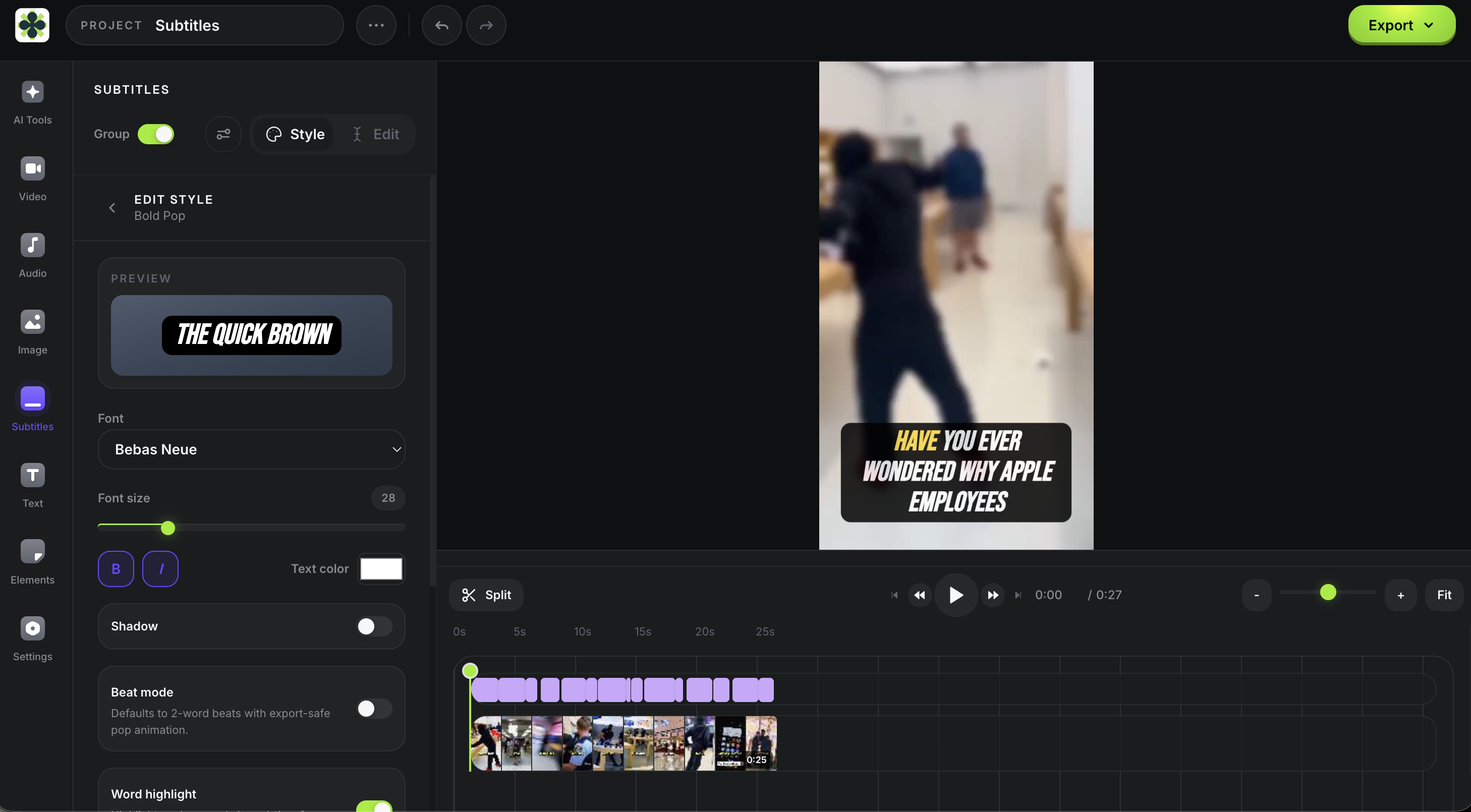
Quick Subtitles integrates directly into Satura's editor. Preview your generated subtitles, make edits as needed, and export after the render finishes.
Quick Subtitles is just one part of Satura. Explore the full suite of AI tools built for creators.
Review an automatic caption draft for accuracy, timing, viewer context, and the next handoff before publishing.
Sign in to preview current voices, review the paid-plan credit estimate, then inspect generated audio in the editor before continuing.
Start a permitted source session on an active paid plan, review suggested clips, then confirm the 30-credit download quote for a rendered clip.
Use an authorized visual brief in the active paid workspace, choose a supported ratio, then inspect the generated PNG draft before using it.
Select one video clip in the signed-in paid editor, review the credit estimate, then inspect the generated result before compositing or export.
In the signed-in paid workspace, review current model inputs, settings, and a credit estimate for authorized material, then inspect the completed draft.
Sign in, connect and select a YouTube channel, then use available context to frame one focused coaching question and next-upload test.
Generate a subtitle draft, review the wording and timing, then export the captioned video. Generation uses credits and requires an active paid Satura plan.
Open Subtitle Workspace