What is the quick answer?
Learn creative asset management for YouTube and short-form creators. Practical workflows, taxonomy tips, and AI tools to organize, reuse, and scale content.
Key takeaways
- What Creative Asset Management Means for Creators
- The pantry version of the idea
- Why Every Growing Creator Hits an Asset Wall
- The growth curve that breaks loose folders
- The Five Building Blocks of a Creator CAM System
- Start with taxonomy, not chaos
Overview
Your desktop is full of half-finished exports, screenshots, and files called final_final_v7. You know the clip that worked, you know the thumbnail that pulled attention, and you still can't find either one without opening twelve folders and a browser tab you swore you'd close later. That's the moment creative asset management stops being a buzzword and starts looking like survival.
For creators, the job isn't just making assets. It's making sure the right clip, thumbnail, caption, or cut is easy to find, safe to reuse, and tied to what performed. A solid system turns your creative work into something you can build on, instead of something you keep recreating from scratch at weird hours.
What Creative Asset Management Means for Creators
Your laptop is not a system. It's a junk drawer with Wi-Fi.
A creator who's five months into Shorts, podcast repurposing, or YouTube uploads usually has the same problem. The raw footage lives on one drive, thumbnails live somewhere else, and the version you posted is buried under three drafts and a mistaken export. Creative asset management is the habit, structure, and tooling that stops that mess from eating your time.
The pantry version of the idea
A kitchen pantry serves as a useful analogy. Footage is the ingredient. Folders are the jars. Tags are the labels. Templates are the recipes. If you can open the pantry, find rice, know which jar is current, and reuse the same base recipe next week, you're already doing creative asset management in spirit.
That's also why it's different from plain file storage. File storage holds things. CAM helps you find, reuse, approve, version, and eventually learn from what you made. The modern view is end-to-end, covering storing, tagging, versioning, retrieving, and activating assets while tying them back to production history and outcomes, not just keeping them on a drive Creative asset management overview.
A useful way to say it out loud is this, creative asset management is the system that keeps your best creative work findable, reusable, and tied to what happened after you published it.
Practical rule: if you can't find last month's winner in under a minute, you don't have a system yet, you have a folder pile.
For creators who want a cleaner mental model, find the right DAM system is a helpful external overview of how storage and management get separated in practice. If you're building your own workflow, a central hub like the one in the Satura creative library can make the “single place to look” idea real instead of theoretical.
And yes, digital asset management overlaps here. DAM is broader in the sense that it organizes rich media and manages rights and permissions, while CAM is more about the production flow that gets assets made, approved, and ready for reuse Digital asset management factsheet. For a creator, that distinction matters because the pain usually starts long before storage becomes a problem.
Why Every Growing Creator Hits an Asset Wall
The wall usually appears in a plain moment. You're about to remake a hook that worked three weeks ago, and suddenly you're digging through folders like someone searching for a receipt in a shoebox. The file exists somewhere, but your system has turned it into a scavenger hunt.
At that point, tidy habits stop carrying the load. What changes in this field is not just storage, it is workflow governance, and that matters because the problem is not only where a file lives, it is how that file moves through request, review, approval, distribution, and analysis Workflow-oriented CAM lifecycle.
The growth curve that breaks loose folders
A solo creator can get by with desktop clutter for a while. One upload a week, maybe two, and the brain can still hold the map. Then the channel starts shipping daily Shorts, the podcast repurposing starts, and every “quick save” becomes a future search problem.
That is when duplicate work starts. You remake a thumbnail because you cannot find the old one. You export a caption again because the approved version got renamed in a way only your past self would understand. Your editing time goes into memory recovery instead of creative decisions.
Disorganization does not just slow you down, it hides the decisions that already worked.
The broad guidance stays consistent here, creators and teams should use a centralized repository with metadata so final assets and in-progress files can be retrieved from one place, rather than scattered across devices and drives Centralized repository guidance. That is not only an enterprise habit. It is the difference between scaling a channel and constantly resetting it.
Once the library grows, remembering the right clip by feel gets unreliable, and a video finder by description becomes useful because retrieval has to keep pace with production. Creators do not need more clutter with better names. They need a way to find, clip, and reuse material without burning time on memory tests.
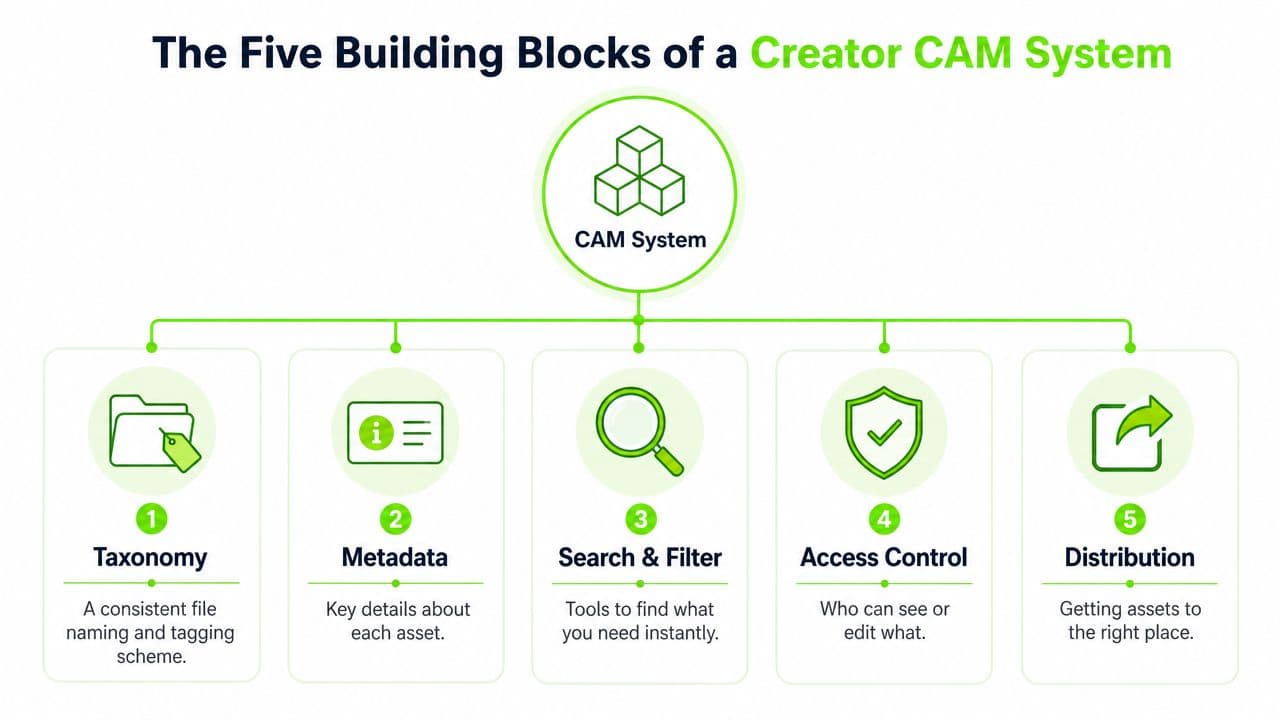
The Five Building Blocks of a Creator CAM System
A creator CAM setup becomes useful when it stops behaving like a pile of folders and starts acting like the command panel for your work. The five pieces below matter because they remove small decisions from your day, so you spend less energy hunting for files and more energy making the next thing.
Start with taxonomy, not chaos
Taxonomy is the logic behind your filing cabinet. Choose whether folders follow niche, series, platform, or client. A YouTube creator might use Long Form, Shorts, Podcast Clips, and Thumbnails, then break each one down by topic or series.
That choice matters because a team can only move fast when the structure matches the way work is made. If your folders follow your calendar instead of your content model, things drift into the wrong place and stay there. A good taxonomy is plain on purpose.
Naming that makes sense to future you
A filename should tell you something useful without making you search your own memory. Shorts_AIProductivity_v03_thumb_final says more than final (3) ever will. One name gives you format, topic, version, and use case. The other gives you a headache.
Versioning should move forward, not overwrite the last file. If you keep replacing the master file directly, that usually means the system needs tighter version control and a clearer approval trail. Mature workflows treat version history as part of the asset, not as clutter to delete.
Automation is the quiet assistant
Automation can route uploads, rename drafts, or tag incoming files without extra manual work. That matters when you are clipping from a long video and do not want to spend an hour on admin before any creative work starts. For creator teams, the five-pillar framing used in planning and asset workflows is a helpful way to separate intake, review, versioning, compliance, and performance measurement, as outlined in the Five-pillars framework.
Small creator rule: automate the repeated steps first, not the interesting ones.
The other building block is simple access control. If you have collaborators, decide who can edit, who can approve, and who can only view. Then use a central directory like Satura tools directory to keep your workflow from splitting into ten separate tabs and a pile of “maybe this is the latest version” conversations.
A Creator Week Running on Creative Asset Management
Monday begins with raw footage from a podcast, a page of notes, and three ideas for Shorts. The creator does not throw everything into a folder and hope memory keeps up. The source media goes into a central library first, gets a clear label, and sits there ready for reuse later. That intake step matters because every good reuse starts with knowing what entered the system.
From long-form to short-form without the scavenger hunt
On Tuesday, the 15-minute podcast gets cut into candidate moments. AI clipping tools can turn long-form material into short-form drafts quickly, which saves the creator from scrubbing through the whole timeline by hand to find the strongest hook. CAM matters here because the system is not only holding assets, it is helping turn old material into new cuts Asset performance and workflow links.
By Wednesday, the review step starts. The creator checks the AI-generated clip against brand rules, reads the caption, and decides whether the tone feels off. If the clip fits the brand, it gets approved and moved toward export. If it does not, the creator edits it before the file goes public.
Thursday is distribution day. The same clip goes out to TikTok, Shorts, and Reels, but the naming stays consistent so the creator can trace which version was posted where. That consistency makes later search possible, especially when several nearly identical cuts exist.
What are the common questions?
What is the short answer for Creative Asset Management: A 2026 Guide for Creators?
Learn creative asset management for YouTube and short-form creators. Practical workflows, taxonomy tips, and AI tools to organize, reuse, and scale content.
What should creators do first?
Audit Your Current Files: Find the projects, exports, and drafts you're using, and note what keeps going missing.
Who is this guide for?
This guide is for YouTube creators, faceless channel operators, agencies, and teams using AI tools to improve video production and growth.
Action checklist
Apply this to your channel today.
- 1Audit Your Current Files: Find the projects, exports, and drafts you're using, and note what keeps going missing.
- 2Choose a Naming Convention: Use filenames that tell you the topic, format, and version without opening the file.
- 3Set Up a Central Hub: Keep active work in one place instead of splitting it across devices and drives.
- 4Tag Key Assets: Use a small, repeatable tag set so search works when memory doesn't.
- 5Define Sharing Rules: Decide who can edit, approve, and export before collaboration gets messy.
- 6Schedule Regular Reviews: Clear out stale drafts and tighten the system before it turns back into clutter.