What is the quick answer?
Stop guessing. Learn the complete YouTube Shorts editing workflow for high retention, from engineering a 3-second hook to using AI tools that stop the scroll.
Key takeaways
- Your Editing Software Does Not Matter
- Editing is attention design
- Use whatever removes friction
- The 3-Second War Engineering the Perfect Hook
- Motion wins the first decision
- On-screen text should sharpen the question
Overview
Most creators still think YouTube Shorts editing is about trimming clips faster. It isn't. It's about controlling attention with brutal precision, and the evidence is pretty clear. Viral Shorts analysis shows the first 3 seconds decide whether the viewer stays, 81% of Shorts use text or captions, and videos with text reached engagement above 5%, compared with under 4% without it, according to this viral Shorts analysis.
That matters because the arena is absurdly crowded. YouTube Shorts are watched over 70 billion times every day, and more than 910 million Shorts have already been posted, based on this YouTube Shorts statistics roundup. In a format capped at 60 seconds and built for 9:16 vertical video, tiny editing decisions become make-or-break decisions.
Good YouTube Shorts editing isn't cleaner cutting. It's engineering the hook, pacing the visual rhythm, timing text to the sentence, and removing every excuse to swipe.
Your Editing Software Does Not Matter
Creators love blaming software because it feels productive. Buy a premium editor, install more plugins, collect transitions, and pretend that's the missing piece. It usually isn't.
At the scale of YouTube Shorts, your real competition isn't another editor. It's the thumb. With Shorts pulling over 70 billion daily views and living inside a feed with more than 910 million posted Shorts, you're competing in the biggest attention market most creators will ever enter, as shown in these YouTube Shorts platform stats. The format itself is strict. 9:16, vertical, and up to 60 seconds. That means the edit has to earn every second.
Editing is attention design
If your Short opens with setup, throat-clearing, or scene explanation, the viewer leaves. If it opens with motion, tension, and a clear promise, the viewer gives you another beat.
That's why I don't judge editors by what software they use. I judge them by whether they can do three things:
Practical rule: A simple editor with strong timing beats a complicated editor with weak judgment every time.
If you're scripting before you edit, a tool that helps you generate short video scripts can tighten the idea before footage ever hits the timeline. That matters more than adding another transition pack later.
- Cut friction early: remove greetings, pauses, and context that the viewer didn't ask for.
- Stage curiosity fast: make the viewer feel there's something incomplete unless they keep watching.
- Pay off clearly: don't confuse speed with chaos. Fast edits still need clean comprehension.
Use whatever removes friction
Most creators don't need a studio setup. They need a workflow that lets them trim, sequence, subtitle, and export without fighting the machine. A browser option like Satura's free video editor for Chromebook makes sense if your current setup slows down your output.
The contrarian truth is simple. Software matters only after you've learned how to shape attention. Before that, it's just a prettier room to make the same mistakes in.
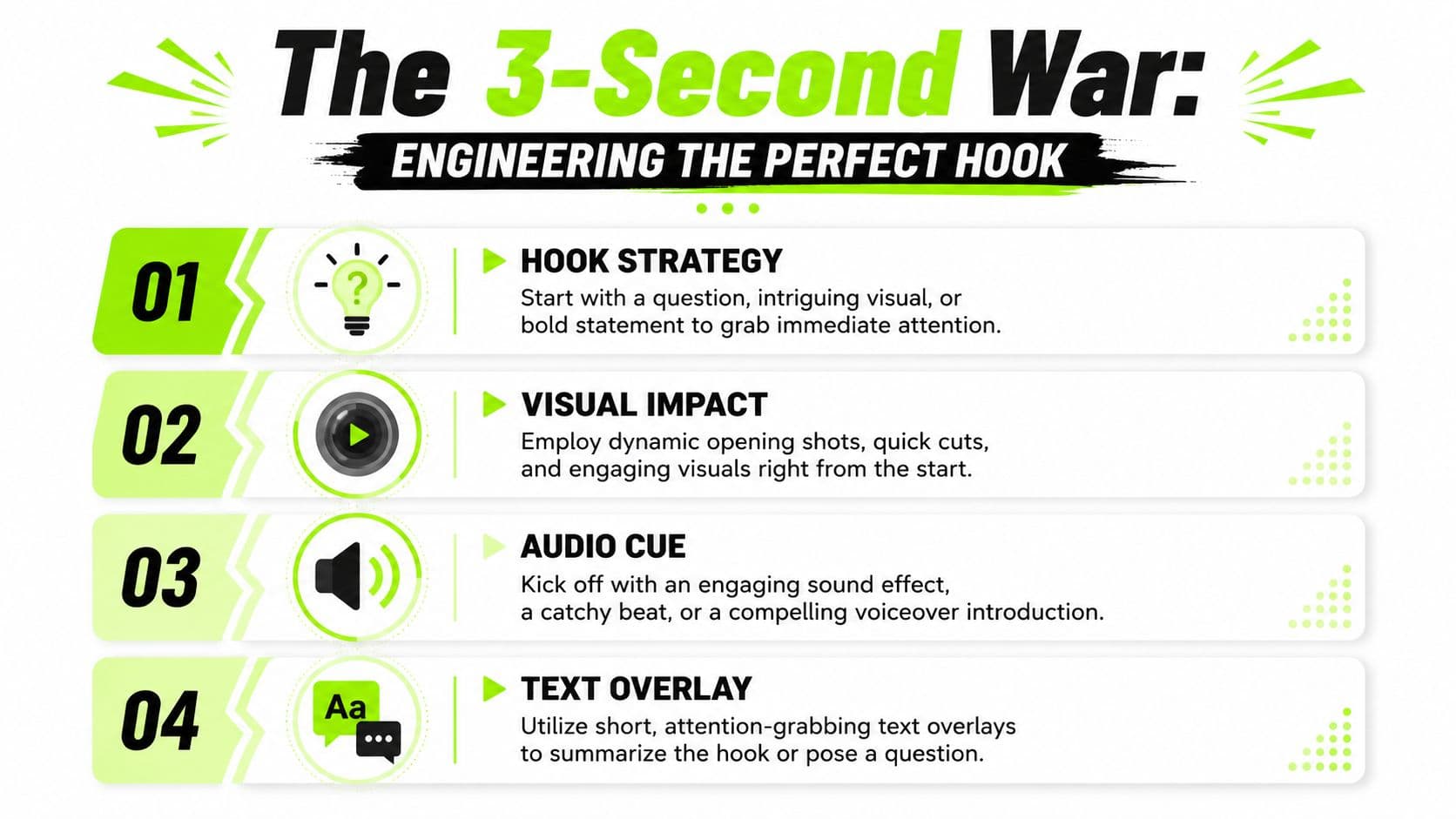
The 3-Second War Engineering the Perfect Hook
You do not earn attention on Shorts. You seize it fast or lose it.
The first three seconds decide whether the viewer keeps watching, swipes away, or rewatches. That choice is rarely about production value. It comes from edit decisions that create instant tension. After cutting a lot of Shorts across different niches, I've found the same pattern over and over. Strong hooks compress three signals into one moment: visual change, a clear promise, and a reason to care right now.
Motion wins the first decision
A static face talking to camera is usually too slow. The eye catches change before the brain evaluates the sentence. That is why a hand entering frame, a fast result reveal, a broken outcome, or a visible mistake often beats a clean intro.
The mistake creators make is opening at the beginning of the story. Shorts usually perform better when the edit opens at the point of tension.
Use openings like these:
That is not style. It is attention psychology. AI analysis of viral clips keeps surfacing the same principle: the brain responds to unresolved change.
- Start with disruption: a product drops into frame, the screen flashes the result, the failure appears before the explanation.
- Begin at the consequence: show the ruined cake, the terrible audio, the failed trade, then explain what caused it.
- Use immediate contrast: before versus after, wrong versus right, cheap versus expensive, myth versus proof.
On-screen text should sharpen the question
Weak text repeats the voiceover. Strong text gives the viewer a cleaner reason to stay.
Bad opening text: “Today I'm testing a camera mic.”
Better opening text: “This mic wrecked my audio.”
The second version creates tension. The viewer now wants the proof, the mistake, or the fix. If you want quick variations before you cut the footage, this YouTube hook generator for testing different opening angles is useful for pressure-testing the premise.
Keep the text short. Front-load the strongest word. If the spoken line explains, let the text raise the stakes. If the visual is chaotic, let the text add clarity.
Build a three-layer hook
The best Shorts hooks feel dense, not busy. Each layer handles a different job.
| Hook element | What it should do |
|---|---|
| Visual first beat | Trigger pattern interruption with motion, surprise, or a result |
| Spoken line | Make a claim, challenge an assumption, or promise a payoff |
| On-screen text | Clarify the stakes in a few words |
| Immediate context | Show why the viewer should care now |
When all four line up, the hook pulls harder. The viewer is reading, listening, and decoding the visual at the same time. That stack buys you another second, and on Shorts, another second is a lot.
Hooks that fail before the content starts
Some intros kill retention on contact.
The fix is simple. Open on proof, tension, or consequence. Then explain.
A good hook should feel slightly unfair. It drops the viewer into an unresolved moment and makes the next second feel necessary.
- Greetings and branding: “Hey guys” spends your highest-value frames on a relationship the viewer has not agreed to yet.
- Delayed relevance: if the payoff is coming later, many viewers will not wait for it.
- Redundant layers: if the voice, text, and visual all deliver the same information, the edit feels flat.
- Context before conflict: background belongs after curiosity, not before it.
Mastering the Vertical Rhythm and Pace
Pacing is where most Shorts die. Not because the idea was bad, but because the edit gave the viewer too many chances to leave.
One of the clearest retention benchmarks comes from this Shorts editing tutorial focused on cadence, which recommends keeping individual shots at roughly 2 seconds or less, using jump cuts to remove pauses, and using J-cuts so the next clip's audio starts before the picture changes.
Cut harder than feels comfortable
If you come from long-form YouTube, your instincts are probably too slow for Shorts. In long-form, a beat can breathe. In Shorts, dead air feels like an exit ramp.
That doesn't mean every frame must be frantic. It means every frame needs a job.
I use this filter when cutting spoken Shorts:
The same logic applies to reaction shots, camera resets, and filler phrases. “Okay,” “so,” “basically,” and “what you want to do is” often disappear cleanly in the edit and instantly tighten the pace.
For creators trying to match pacing to format, this guide on how long a YouTube Short should be is useful because runtime changes how aggressive your cut density needs to feel.
- If the pause adds emotion, keep it
- If the pause adds clarity, maybe keep it
- If the pause adds nothing, kill it
J-cuts make fast edits feel smooth
Fast cutting without audio strategy feels amateur. The viewer can tolerate aggressive visual changes if the audio carries them forward.
That's why J-cuts work so well in YouTube Shorts editing. You let the next line start slightly before the image changes. The ear arrives first, then the eye catches up. The transition feels intentional instead of abrupt.
Editing note: If your Short feels choppy, the problem usually isn't the number of cuts. It's the way the audio bridges them.
Use J-cuts in moments like these:
A quick visual example helps here:
- Switching angles during a sentence
- Moving from talking head to B-roll
- Entering the payoff before the old shot has fully worn out
What are the common questions?
What is the short answer for YouTube Shorts Editing: The High-Retention Playbook?
Stop guessing. Learn the complete YouTube Shorts editing workflow for high retention, from engineering a 3-second hook to using AI tools that stop the scroll.
What should creators do first?
Run AI on the raw footage. Pull candidate moments, remove obvious dead space, and generate captions.
Who is this guide for?
This guide is for YouTube creators, faceless channel operators, agencies, and teams using AI tools to improve video production and growth.
Action checklist
Apply this to your channel today.
- 1Run AI on the raw footage. Pull candidate moments, remove obvious dead space, and generate captions.
- 2Reject weak excerpts aggressively. If a clip needs extra explanation to make sense, it is not a Short yet.
- 3Rewrite the first line. Long-form intros are usually too polite and too slow.
- 4Retime captions by hand. Good editors sync text to attention peaks, not just spoken words.
- 5Add visual resets and payoff cues. B-roll, punch-ins, pauses, and sound accents should support the idea, not decorate it.
Sources & methodology
- Satura editorial guide based on the source video, topic cluster, and article sections.
- Source video reviewed for this article: https://www.outrank.so/