Character-first generation
Start from an AI-generated look or your own image or video reference instead of asking a general video model to reinvent the subject in every clip.

Create an original character, shape the scene, and turn one prompt into a vertical AI clip. Then open the result in Satura to add captions, voiceover, layers, and the final cut.
Illustrative AI-generated character frame
Best for new, character-led scenes. Have existing long-form footage instead? Use AutoClip.
Explore all Shorts toolsHow it works
The generator narrows the job before rendering: who appears, what happens, how the scene should feel, and where the story lands. That gives you a more deliberate starting point than a one-line generic prompt.
Generate a new character look or upload an image or video reference. Select one or two characters for the scene.
Set the story idea, location, tone, payoff, dialogue, and native-audio preference, or write the complete prompt yourself.
Review prompt warnings, choose a 12, 16, or 20 second duration, confirm the generation quote, and render in 9:16.
Watch the result, keep the useful take, and open it as an editor project when it needs captions, voiceover, layers, or a tighter cut.
Built for recurring stories
Strong short-form series need more than a visual style. They need a recognizable subject, a clear action, and a payoff worth watching. Satura keeps those decisions visible before the render starts.
Open the character generatorStart from an AI-generated look or your own image or video reference instead of asking a general video model to reinvent the subject in every clip.
Build a solo reaction, dialogue beat, recurring host, or simple two-character exchange without putting yourself on camera.
Define the setting, tone, payoff, dialogue, and sound intent so the generation has a narrative job rather than a vague visual prompt.
Review warnings before spending credits, then revise unclear character actions, dialogue, or scene instructions that could weaken the result.
Generate 9:16 clips at 12, 16, or 20 seconds. Available resolution and generation cost are shown in the tool before you start.
Move a generated take into Satura's browser editor to add subtitles, voiceover, music, overlays, timing changes, and the final export.
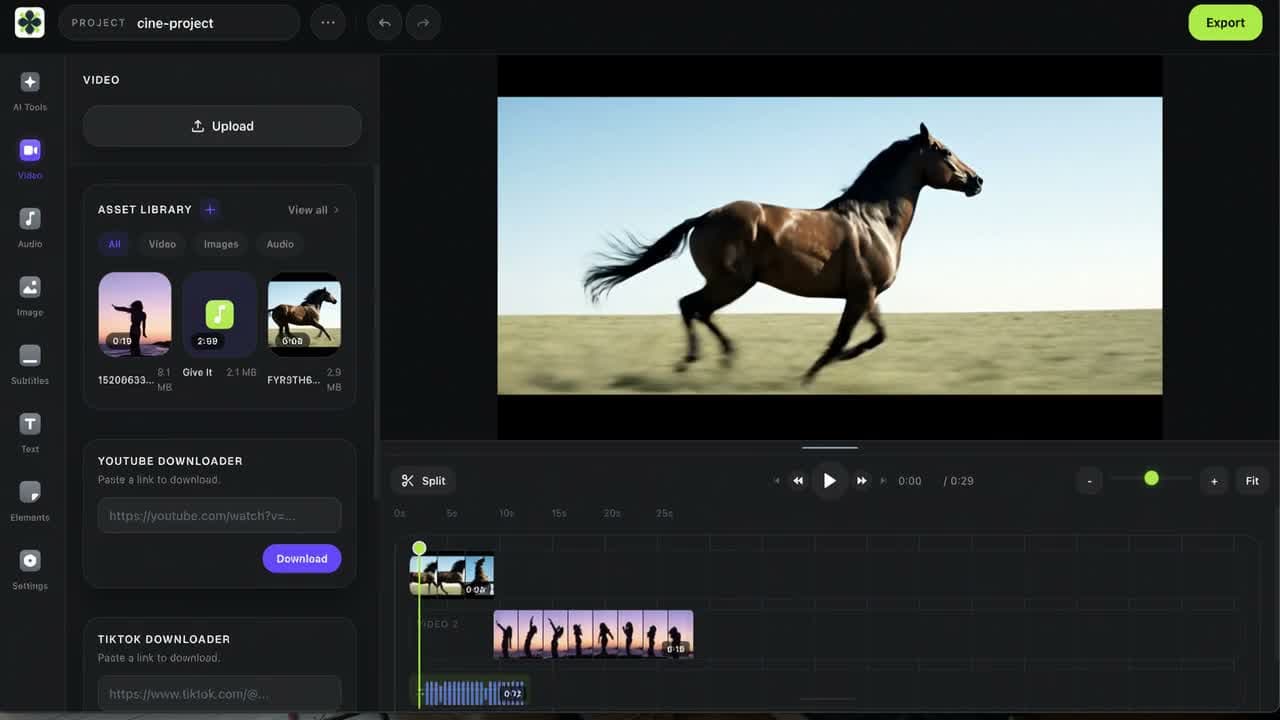
Generation is the first cut
Generated footage can still need a sharper opening, cleaner audio, readable captions, or another visual beat. The editor handoff lets you treat the AI output as source material instead of an untouchable final video.
Choose by source material
These pages target different jobs. Use this generator for a new character scene, AutoClip for an existing long video, and the editor when you already have footage that needs a controlled finish.
| Your starting point | Use this tool | Expected output |
|---|---|---|
| A story idea and a recurring character | AI YouTube Shorts Generator | A new 9:16 character clip from a structured prompt |
| A movement reference and a character image | Motion Control | A character motion-transfer draft to review in the editor; requires an active paid Satura plan and credits |
| A podcast, interview, webinar, or long video | AutoClip | Candidate short clips extracted from existing footage |
| An existing clip that needs cutting and captions | YouTube Shorts Video Editor | A manually refined vertical edit |
| An idea that still needs a timed script | YouTube Shorts Script Generator | Hook, voiceover, visual, payoff, and CTA beats |
| Standalone B-roll or model-by-model testing | AI Video Generator | Individual clips from Sora, Veo, Kling, and other models |
Publish responsibly
Check the final video for originality, rights, disclosure, and viewer value. These official YouTube sources are the rules to review before upload, not a promise that a generated Short will rank or earn revenue.
YouTube says square or vertical uploads up to three minutes can be categorized as Shorts. Satura's character workflow produces shorter 9:16 scenes designed to become part of that upload.
YouTube Help: three-minute ShortsYouTube requires disclosure when AI meaningfully generates or alters realistic people, places, events, or scenes. Review the current examples during upload instead of assuming every animated or realistic clip is treated the same.
YouTube Help: GenAI disclosureA generator is a production tool, not a monetization shortcut. YouTube's policies expect original, authentic work and may reject generic, repetitive, or mass-produced channels from monetization.
YouTube channel monetization policiesAI Shorts generator FAQ
An AI YouTube Shorts generator turns an idea, prompt, and visual references into a short vertical video. Satura's workflow specializes in character-led clips: choose or create a character, define the scene and story controls, generate a 9:16 clip, then continue editing the result.
Yes. You can use a fictional or branded character instead of appearing on camera. Faceless does not mean generic: give each Short a distinct story, point of view, or useful payoff and review YouTube's originality rules before publishing at scale.
The workflow is built around saved character references. You can generate a character look or upload an image or video reference, then select that character again for later scenes. Review every output because generative video can still vary details between takes.
The current character-Shorts workflow offers 12, 16, and 20 second durations in a vertical 9:16 aspect ratio. You can use one clip as a complete micro-story or combine and refine clips in the editor.
No. The AI YouTube Shorts Generator creates a new character scene from references and a prompt. AutoClip starts with an existing long video and finds candidate moments to repurpose. Use the tool that matches your source material.
Yes. Open the generated result in Satura's browser editor, then add subtitles, voiceover, music, overlays, additional clips, or timing changes before export. The character generator itself focuses on producing the core scene.
No. Generate and edit the video in Satura, export the finished file, then review the title, audience setting, rights, AI disclosure, and visibility controls when uploading through YouTube or YouTube Studio.
AI use alone does not guarantee or prevent monetization. YouTube evaluates originality, authenticity, repetition, rights, advertiser suitability, and other channel-level policies. Build distinct stories and creative value rather than publishing interchangeable template output.
Continue the workflow
Start with one clear story beat, generate the strongest take, and finish it with the level of editing your audience deserves.
Generate a Character Short