What is the quick answer?
Learn how to make highlights from long videos that hook viewers, keep retention high, and convert to Shorts, Reels, and TikTok views.
Key takeaways
- What Great Highlights Really Are and Why Most Fall Flat
- Define the win before you cut
- Finding the Moments Worth Clipping
- Score candidates before touching the edit
- Match the moment to the goal
- Turning Long Videos Into Tight Highlight Clips With AI
Overview
You've got a two-hour podcast, stream, interview, or match recording sitting on your drive. You know there are good moments in it, but the first few clips you posted barely moved. The problem usually isn't the source material. It's that a highlight isn't just a shorter video. It's a performance-focused edit built around a clear moment, an immediate promise, and pacing that earns the next second.
Learning how to make highlights means making decisions before, during, and after the edit. You need to select moments with a purpose, preserve enough context for them to make sense, engineer the opening, package the clip for its platform, and use retention data to improve the next batch.
What Great Highlights Really Are and Why Most Fall Flat
A strong highlight earns attention before the viewer knows the source. It centers on a clear moment, makes an immediate promise, and moves with enough purpose to earn the next second. The edit has to work for a stranger, not only for someone who watched the full conversation.
That standard explains why many clips underperform. A creator spots a funny reaction, removes the silence, adds subtitles, and exports. The moment may be good, yet the clip opens with setup, relies on context that never appears, or delays the payoff. Viewers have no reason to wait through those gaps.
Practical rule: If the viewer needs your explanation before understanding why the moment matters, the edit still needs work.
Relentless cutting keeps the central idea visible, but it should not make the clip frantic. Remove repeated points, empty pauses, throat-clearing, and detours. Keep the line that changes the conversation, the reaction that raises the stakes, or the answer that resolves the question. Build rhythm through reframing, captions, b-roll, visual changes, or a deliberate interruption.
A static podcast or talking-head recording benefits from pattern interrupts. A crop change, reaction shot, highlighted word, sound accent, or supporting visual can reset attention while keeping the speaker easy to follow. Every change should clarify, intensify, or refresh the moment. Decoration without a job creates noise.
Define the win before you cut
An educational clip needs clarity and a complete takeaway. A clip aimed at virality can prioritize surprise, conflict, humor, or a strong opinion. A monetization-focused clip needs a credible promise and enough substance to build trust. Community content may depend on an inside joke or a recognizable interaction.
The objective determines what survives the cut. Ask, “Which moment can deliver a satisfying experience to a stranger?” That question is more useful than just choosing the part you enjoyed most.
Performance also depends on the source. A sports edit needs the sequence that gives a play meaning, rather than one isolated frame. AI can help generate 2026 sports videos, but selection and context still shape the result. Score each candidate by its hook, stakes, clarity, and payoff, then use retention data to test whether the opening and pacing earned attention. Exporting is the final step, not the definition of success.
Finding the Moments Worth Clipping
Don't open the timeline and scrub randomly. Start with the transcript, chapter markers, chat log, or notes, then search for moments that can carry a complete short-form idea.
A useful review system gives every candidate a role:
A single moment can fill more than one role. A streamer's sudden reaction might be the hook and the payoff. A podcaster's controversial claim might open the clip, while a later example supplies the proof.

- Hook: The question, claim, reveal, or reaction that can open the clip.
- Proof: The example, demonstration, result, or specific explanation that makes the hook credible.
- Support: The context that helps the viewer understand the point without slowing it down.
- Closer: The conclusion, punchline, takeaway, or open loop that gives the clip an ending.
Score candidates before touching the edit
Use a simple scoring pass rather than trusting your memory. Give each scene a qualitative or numeric score for relevance, emotional energy, clarity, and standalone potential, then note the intended goal. A strong educational scene may score highly for clarity and proof even if it has little drama. A viral candidate may win on surprise and emotion but need extra context.
The important part is consistency. If you review several hours of footage without a system, you'll overvalue whatever made you laugh five minutes ago and overlook the quieter explanation that viewers need.
A human-in-the-loop workflow becomes more reliable when you score candidate scenes first, then merge adjacent scenes with non-zero scores into one highlight. This reduces fragmentation and preserves narrative continuity, as described in the scene scoring and merging workflow.
Match the moment to the goal
Ask four questions for every candidate:
A clip that serves none of these goals is probably just a fragment. For Twitch creators, a practical developer guide to Twitch clips can help clarify the mechanics of capturing moments, but the creative decision still comes first. Use a transcript-first clip finder to reduce the search time, then watch enough surrounding footage to confirm that the moment has a beginning, middle, and end.
- Education: Does the viewer leave with one understandable idea?
- Virality: Is there tension, surprise, humor, disagreement, or a strong emotional turn?
- Monetization: Does the moment demonstrate expertise or create a reason to explore the creator's offer?
- Community: Would existing fans recognize the person, relationship, or recurring format?
Turning Long Videos Into Tight Highlight Clips With AI
Once you've selected candidates, build the clips in passes. AI can accelerate discovery and assembly, but it shouldn't make the final editorial decision without review.
Start by segmenting the source into scenes. A scene might contain a question and answer, a complete story beat, a reaction sequence, or a continuous section of gameplay. Score those scenes, remove candidates that don't serve the goal, and merge neighboring scored scenes when they belong to the same thought.
The merge step matters because AI systems can overreact to isolated high-salience frames. A laugh, raised voice, or sudden movement may look important on its own, but cutting directly around it can remove the setup that makes the reaction understandable. Preserve adjacent material when it carries the question, cause, or consequence.
A practical AI-assisted workflow
Tools such as AutoClip can speed up the first extraction pass. The advantage isn't that AI magically knows your audience. It's that the system can reduce the amount of footage you need to inspect, leaving you more time for judgment, pacing, and packaging.
A good candidate still needs human review. AI may select a sentence that sounds powerful but depends on a previous answer. It may cut off a reaction too early, miss an important visual cue, or join scenes that share a keyword but not a narrative. Treat automated clips as a ranked shortlist, not a finished publishing queue.
Here's the assembly principle in action:
The strongest workflow combines automation with editorial control. Let the tool find, transcribe, group, and rank. You decide what deserves attention, what context stays, and where the clip should end.
- Import the source. Upload the raw video or bring in a supported YouTube or TikTok link.
- Generate candidates. Use transcript analysis, scene detection, and audio or visual signals to identify possible highlights.
- Rank the results. Review the candidates by goal, not just by energy. A dramatic moment isn't automatically a useful clip.
- Trim the edges. Remove dead air and repeated wording, but keep the minimum context needed for comprehension.
- Merge related scenes. Join adjacent scored scenes so the clip follows a coherent narrative.
- Review manually. Check names, claims, reactions, captions, and transitions before export.
Polishing Your Highlights So Viewers Keep Watching
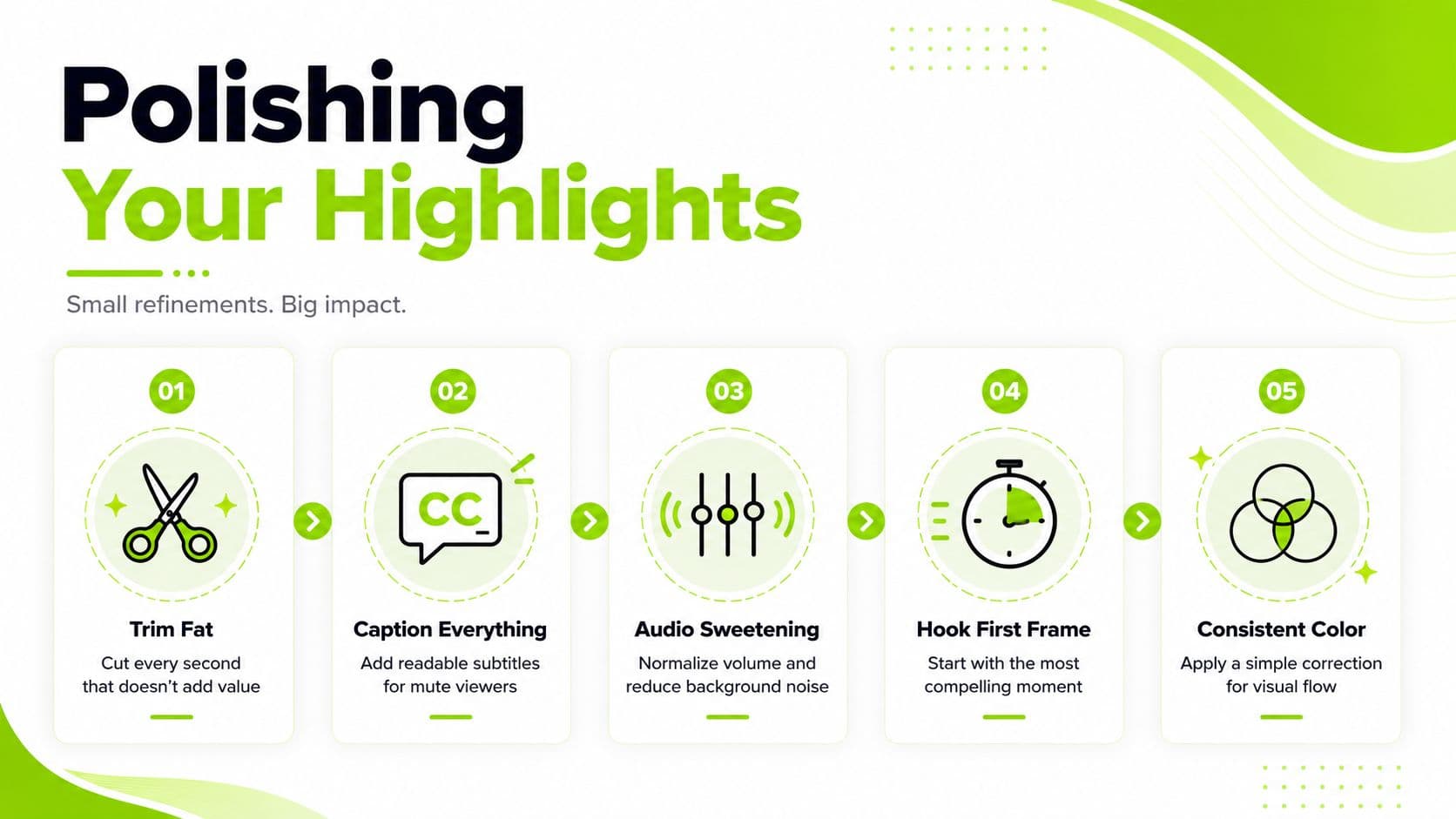
The rough cut proves the moment works. Polishing determines whether viewers can follow it on a phone, in a noisy room, or with the sound off. Treat each edit as a retention decision. Every cut should clarify the idea, sharpen the emotion, or keep attention moving.
Start by removing anything that delays the point. Keep a pause when it builds tension. Cut the hesitation caused by searching for words, along with repeated explanations, verbal filler, greetings, long reactions, and closing remarks that add no payoff.
Build for sound-off viewing
One clipping guide reports that 85% of social video is watched muted, so captions belong to the viewing experience (caption guidance for podcasters). Use large, readable text, identify speakers when several people appear, and emphasize the words that carry the argument.
Give the key phrase more visual weight than the surrounding transcript. Highlight the claim, emotional turn, or line viewers should remember. Keep captions clear of interface elements, then review them on a small screen before publishing.
Make every visual choice earn its place
The first frame needs an immediate signal, such as motion, a clear facial expression, visible action, or an understandable caption. Make the hook visually active within the first 0.5 to 1 second, then introduce changes often enough to prevent a static composition from disappearing in the feed.
Use reframing to direct attention. Add a punch-in when the speaker delivers an important point, switch to a reaction when it improves comprehension, and use b-roll when it clarifies or intensifies the idea. Constant movement quickly becomes noise, so match each visual change to the spoken beat.
Audio polish carries equal weight. Normalize inconsistent volume, reduce distracting background noise, and use subtle sound design to mark transitions or punchlines. Background music should support the speaker and leave the words easy to understand.
Consistent color correction helps footage from different cameras feel connected. Give the thumbnail a deliberate pass when the platform shows a cover image before playback. The visual promise should match the clip itself. For practical guidance, see what makes a good YouTube thumbnail.
Packaging Highlights for Shorts Reels and TikTok
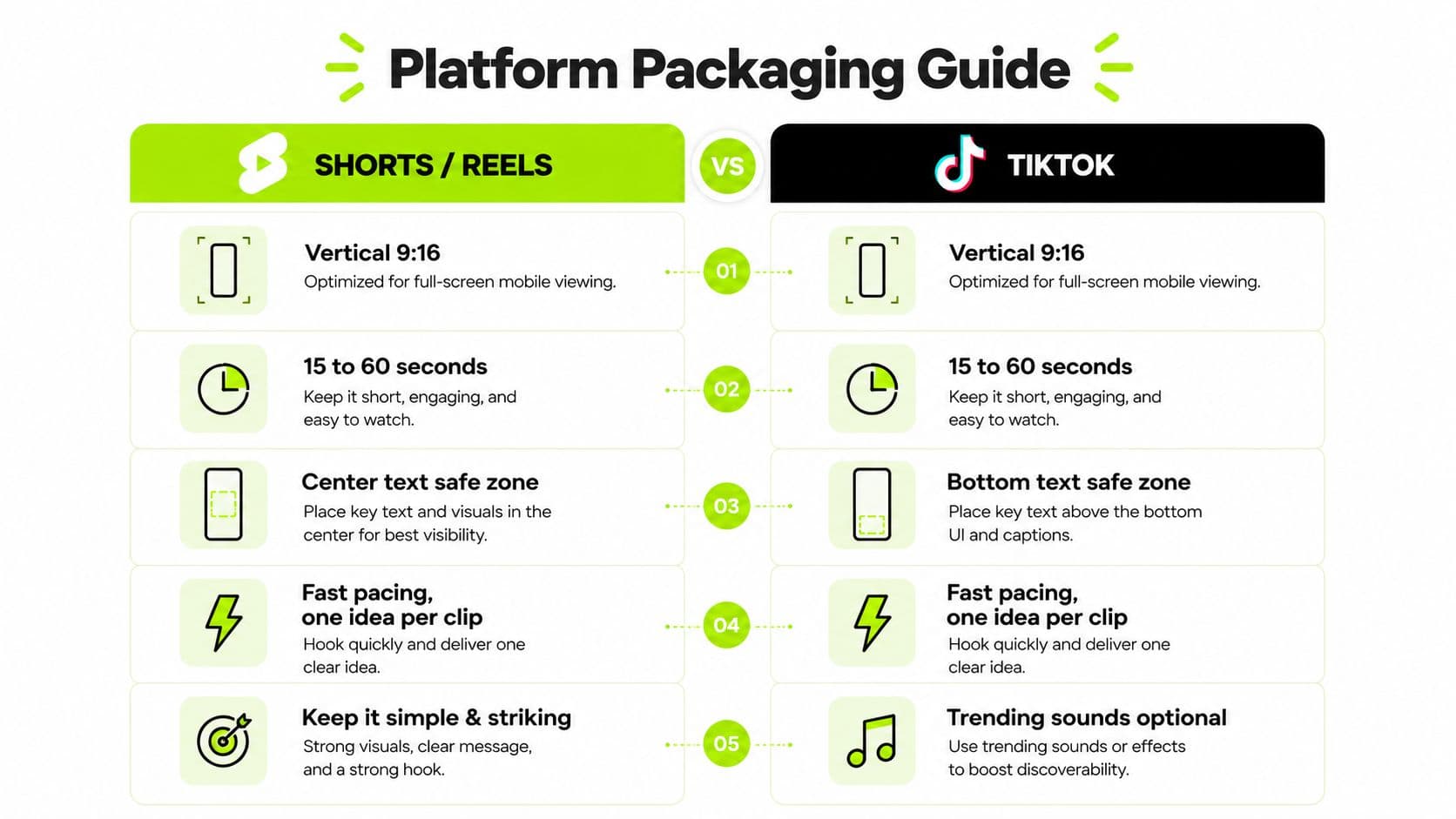
A finished clip can still underperform if the export and opening don't fit the platform. Start with a vertical 9:16 composition. YouTube Shorts guidance commonly specifies 1080 × 1920 pixels, with frame rates up to 60 FPS and a bitrate range of about 15 to 25 Mbps for smooth playback (short-form video specifications).
Keep the master clean, then adapt the presentation for each destination. Shorts and Reels generally benefit from centered captions and a single clear idea. TikTok gives you more room to experiment with native sounds and lower-screen text placement, but the viewer still needs to understand the clip immediately.
What are the common questions?
What is the short answer for How to Make Highlights That Actually Get Watched?
Learn how to make highlights from long videos that hook viewers, keep retention high, and convert to Shorts, Reels, and TikTok views.
What should creators do first?
Early drop-off: The opening lacks clarity, movement, or a strong enough promise.
Who is this guide for?
This guide is for YouTube creators, faceless channel operators, agencies, and teams using AI tools to improve video production and growth.
Action checklist
Apply this to your channel today.
- 1Early drop-off: The opening lacks clarity, movement, or a strong enough promise.
- 2Drop after the hook: The setup runs too long, or the promised payoff never arrives.
- 3Steady decline: The pacing holds, but the idea lacks tension or progression.
- 4Strong completion with weak sharing: Viewers understood the clip, yet it may not feel useful, surprising, or socially relevant.
- 5Good retention with inconsistent results: Packaging, topic selection, or posting consistency may be limiting reach.
Sources & methodology
- Satura editorial guide based on the source video, topic cluster, and article sections.
- Source video reviewed for this article: https://www.outrank.so/