What is the quick answer?
Learn how to create a link for a video on any platform. Our guide covers YouTube, TikTok, direct files, tracked links, and best practices for sharing.
Key takeaways
- So You Made a Video Now What
- The Foundation From a File to a Shareable Link
- The simplest working method
- When this link type works and when it doesnt
- Platform Power Plays Grabbing Links from YouTube and TikTok
- YouTube link choices matter
Overview
You exported the video. It looks good. It's sitting on your desktop with a file name like final_v3_REAL_final.mp4, and now you need to send it to someone, post it somewhere, or plug it into the rest of your workflow.
That's where most “how to create a link for a video” advice falls apart. It treats every video link like the same thing. It isn't. A private review link is not the same as a public share link. A YouTube unlisted link is not the same as an embed link. A link for a sponsor, a client, a teammate, and your audience should not be handled the same way.
The question isn't just how to create a link for a video. It's what kind of video link fits the job. If you pick the wrong one, you create friction fast. People can't access the file, the link looks messy in a newsletter, or the viewer lands in the wrong place and drops off.
If you're clipping long-form content regularly, it also helps to think beyond the first upload. Tools that help you identify reusable moments can speed up the path from source video to shareable asset, which is why creator workflows often start earlier than the link itself. A useful example is Satura's video clip finder, which focuses on locating segments worth turning into separate pieces of content.
So You Made a Video Now What
A finished video on your hard drive is still offline. Until it lives somewhere accessible, you don't really have a distribution asset. You just have a file.
That's why “create a link for a video” sounds simple but usually hides three different jobs. You might need to send a draft to an editor. You might need a clean public link for a newsletter. Or you might need a version that lives inside a blog post, sales page, or course portal.
Practical rule: Choose the link type based on the next action you want the viewer to take, not based on whichever share button is easiest to click.
Here's the quick decision framework most creators need:
A lot of confusion comes from search results mixing all of these together. Some pages show how to copy a file URL. Others show how to grab a social post link. Others blur the line between editing, hosting, and publishing. That's not helpful when you're trying to move fast.
Creators who work across long-form and short-form feel this the most. A YouTube link might be the source. A private draft link might be the review step. A new export link might be what you finally publish. Those are different moments in the same pipeline.
- Private review link: Use this when you want feedback, approvals, or limited access.
- Public share link: Use this when the goal is reach and frictionless viewing.
- Unlisted or controlled link: Use this when you want access without full public discovery.
- Embed link: Use this when the video should live inside a site, article, or landing page.
- Direct file link: Use this when someone needs the actual asset, not just a player.
The Foundation From a File to a Shareable Link
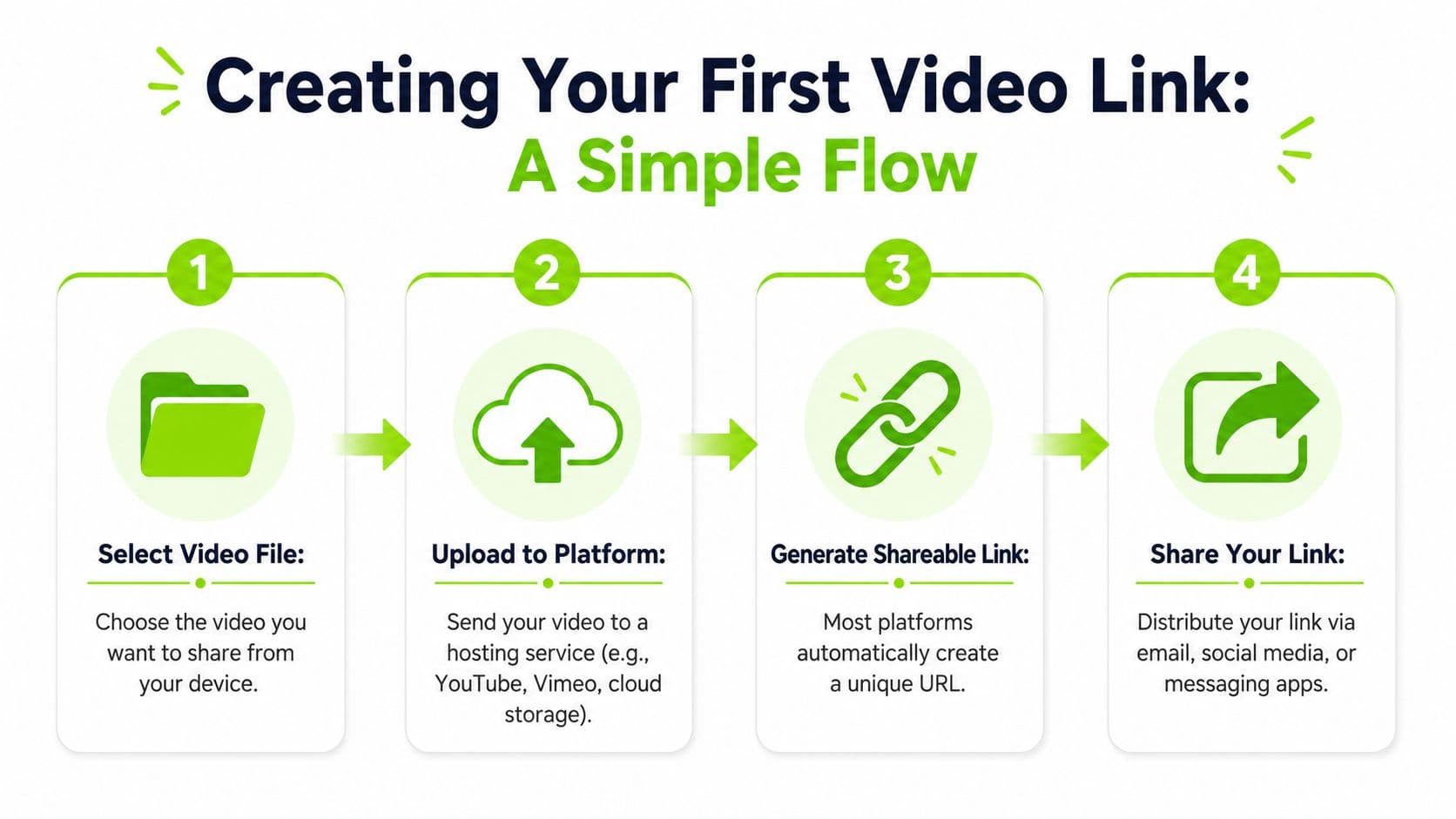
If your video only exists on your computer, the fastest path is cloud hosting. That takes the video from device-bound storage to a URL someone else can open.
Google's own sharing walkthrough shows a standard desktop flow in Google Drive: upload the file, right-click it, choose Share, change access from restricted to anyone with the link, then copy the generated URL for viewing or downloading in Google Drive's sharing flow walkthrough. That's the clean baseline that is typically needed first.
The simplest working method
Here's the no-nonsense version:
If you're doing this on mobile, a tutorial shows a similar Google Drive flow: upload the file, tap the video, open the three-dot menu, and choose copy link in this Google Drive mobile tutorial. That's handy when you need a stable URL for a message, form, or quick team review.
- Upload the file to a cloud platform like Google Drive.
- Open sharing settings on that uploaded video.
- Change permissions so the intended person can access it.
- Copy the link and test it in a private browser window before sending.
When this link type works and when it doesnt
This type of link works well when speed matters more than presentation.
It works less well when the viewing experience matters. Cloud-drive links can feel clunky for public-facing campaigns, and they aren't ideal when you want the video embedded cleanly on a site. If that's your next step, a dedicated hosting or embed-friendly setup makes more sense. If you need that website layer, OctoStream's guide to embedding video is a useful walkthrough for the actual on-page side of distribution.
One more thing. Don't upload a rough cut, paste the link, and call it done. Rename the file, trim obvious dead air, and make sure the export is the version you want people to associate with you. A browser-based workflow can help before the upload stage if you still need cleanup, especially if you're dealing with common format issues like MP4. A tool focused on editing MP4 videos online can fit naturally into the process.
- Good for drafts: You need feedback from a client, editor, or teammate.
- Good for file delivery: Someone needs access today, not after a platform upload and metadata setup.
- Good for internal workflows: Teams often just need a stable URL inside email, Slack, or docs.
Platform Power Plays Grabbing Links from YouTube and TikTok
A lot of creators don't need to make a fresh link from a local file. The video is already online. They just need the right platform link.
Lazy advice often causes problems. “Just hit share” is technically true and strategically weak. On major platforms, the settings around the link matter as much as the link itself.
YouTube link choices matter
On YouTube, the big distinction is visibility:
| Link type | Best use | Main trade-off |
|---|---|---|
| Public | Broad distribution, discovery, social sharing | Anyone can find it |
| Unlisted | Portfolio pieces, pre-release reviews, sponsor previews | Anyone with the link can still pass it around |
| Private | Tight access control | More friction for viewers |
If you're sending something to a brand before launch, unlisted is usually the practical move. If you're publishing a finished tutorial and want maximum reach, use public. If the footage is sensitive or limited to named viewers, private is safer, but it's also less convenient.
Don't choose visibility based on what feels exclusive. Choose it based on whether you want the link to spread.
YouTube links are also useful as source material in broader workflows. If you plan to repurpose long-form into short-form, grabbing the clean video URL early makes that easier. For creators doing platform crossover, Mallary.ai's guide to posting a YouTube video on Instagram is a practical look at how that handoff works.
If your job is to pull the source file or URL from YouTube so you can use it elsewhere in your stack, a dedicated YouTube downloader workflow can be useful.
TikTok links are simple but context matters
TikTok is more straightforward. Usually, you open the video, tap Share, and copy the link. The mechanics aren't hard. The judgment call is what you do with that link next.
A TikTok link is fine when:
A TikTok link is less ideal when you need a polished viewing experience outside the app. In those cases, exporting a separate asset or hosting a platform-neutral version is usually cleaner.
The mistake is assuming every copied platform URL is ready for every use case. It isn't. A YouTube audience, a sponsor review, a course module, and a TikTok viewer all tolerate different levels of friction.
- You want native context: Comments, profile identity, and platform social proof stay attached.
- You're referencing the original post: Useful for collaboration, reaction content, or internal review.
- You're importing into another workflow: Especially for repurposing or archive purposes.
Pro Level Links That Drive Action
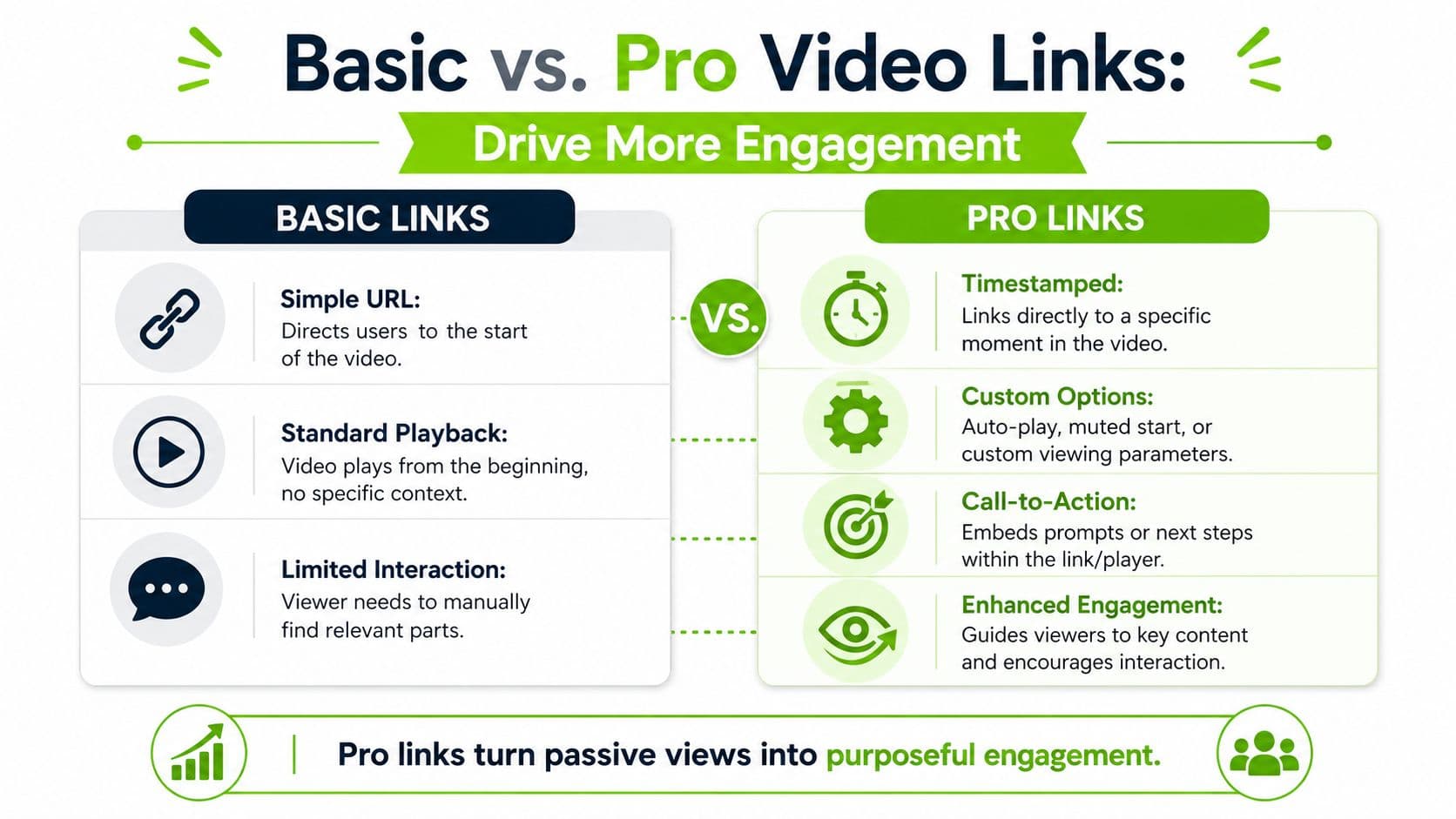
A basic link gets people to the video. A pro link gets them to the right moment, in the right format, with a clear next step.
That difference matters because the most impactful move isn't link generation by itself. It's pairing the link with a clear path forward. HubSpot recommends placing a clickable link directly in the video when conversion matters and says every video should end with a call-to-action in its guide to making a marketing video. If the viewer doesn't know where to click or why, the link feels disconnected from the story.
Timestamp links for precision
Timestamp links are one of the easiest upgrades.
Use them when:
On YouTube, this usually means generating or editing the URL so playback starts at a specific point. The practical effect is simple. You cut out the “wait, where is the relevant part?” moment.
Send viewers to the payoff, not just to the file.
That's especially useful for coaches, educators, commentary creators, and anyone sending references in email or chat.
- A tutorial has one key step and you want viewers to land there directly
- A podcast clip starts late and the payoff is buried
- You're citing a source moment and don't want people scrubbing manually
Embed and download links for control
Embed links and direct-download links solve different problems.
Embed links are for experience control. You want the video inside a blog post, product page, lesson, or resource hub so the surrounding copy does part of the selling and explaining. The viewer stays in your environment instead of bouncing to a watch page full of distractions.
Direct-download links are for asset handoff. This is what you use when an editor, client, partner, or press contact needs the actual file, not a streaming page.
A quick comparison makes the choice easier:
| Link style | Use it when | Avoid it when |
|---|---|---|
| Timestamp link | One exact moment matters | The whole video needs full context |
| Embed link | The page around the video matters | You only need quick sharing |
| Direct download link | The recipient needs the file itself | You want frictionless playback |
If your process also involves captioning, quoting, or turning spoken content into supporting assets, transcription belongs earlier than most creators think. A video transcription workflow makes it easier to turn one source video into multiple useful link destinations, including clips, summaries, and referenced moments.
The Creator Fast Lane Linking and Exporting with Satura
The phrase “create a link for a video” gets messy because it can mean three different things at once: importing a source URL, sharing a draft, or exporting a new finished asset. That ambiguity is a real gap in creator workflows. One tool page highlights the issue directly, noting that search results often mix several tasks and that the better question is what kind of video link should I create for this goal in ScreenPal's video link page.
That's exactly how modern creators tend to work. The first link is often just raw input. A YouTube or TikTok URL comes in. Then the actual work begins: clip selection, trimming, captions, reframing, cleanup, export, review, and distribution.
What are the common questions?
What is the short answer for How to Create a Link for a Video: The 2026 Creator's Guide?
Learn how to create a link for a video on any platform. Our guide covers YouTube, TikTok, direct files, tracked links, and best practices for sharing.
What should creators do first?
Basic measurement: Many short-link tools offer click data that helps you compare placements.
Who is this guide for?
This guide is for YouTube creators, faceless channel operators, agencies, and teams using AI tools to improve video production and growth.
Action checklist
Apply this to your channel today.
- 1Basic measurement: Many short-link tools offer click data that helps you compare placements.
- 2Lead with the outcome: Tell viewers what they'll learn, see, or get.
- 3Match the platform: Newsletter copy can be fuller. Social copy usually needs to hit faster.
- 4Keep one next step: Don't ask the same viewer to watch, subscribe, comment, and buy in the same line.
- 5Use tracking thoughtfully: If you use campaign parameters, keep naming conventions consistent so your reporting stays readable.
Sources & methodology
- Satura editorial guide based on the source video, topic cluster, and article sections.
- Source video reviewed for this article: https://www.outrank.so/