What is the quick answer?
Learn how to make professional videos for YouTube or TikTok with our complete 2026 guide. We cover planning, gear, editing, AI tools, and growth hacks.
Key takeaways
- The Pro Video Misconception
- Professional means repeatable
- The Blueprint Before You Film
- Start with the hook, not the intro
- Build a shot list that saves your edit
- Your Affordable Home Studio Setup
Overview
You've probably done this already. You record a video, open your editor, start cutting, add music, tweak the colors, and still end up with something that feels oddly homemade. Not bad, exactly. Just not sharp, not smooth, not like the videos you compare yourself to.
That gap frustrates a lot of creators because they assume “professional” means expensive camera, perfect studio, and years of editing scars. It doesn't. Professional video is a system. Once you treat it like a workflow instead of a talent contest, quality gets easier to repeat, and growth stops feeling random.
The Pro Video Misconception
Most creators think pro video starts with gear. That's the first mistake.
The difference between amateur and professional work usually shows up in planning, shot discipline, audio choices, pacing, and packaging. Gear matters, but it matters later. If your message wanders, your audio is rough, and your cuts feel clunky, a nicer camera won't rescue the video. It will just give you a sharper version of the same problem.
There's also a bigger reason this matters now. Video isn't some side-format anymore. The global video production services market is valued at $62.4 billion in 2025 and projected to reach $118.7 billion by 2034 at a 7.4% CAGR, according to DataIntelo's video production services market report. That kind of demand changes the standard. Video is now business infrastructure for creators, brands, educators, and media companies.
Professional means repeatable
A professional result is one you can produce again next week, without chaos.
That means you need a system for:
Practical rule: If you can't explain how you made a good video, you probably got lucky.
The good news is that modern tools are shrinking the gap between solo creator and full team. You can automate a lot of the slow, annoying work now. That doesn't replace judgment. It gives you more room to use it. If you want to learn how to make professional videos consistently, stop chasing a cinematic fantasy and start building a workflow you can trust.
- Planning: What's the hook, promise, and structure?
- Capturing: What setup gives you clean image and sound every time?
- Editing: What gets cut, tightened, enhanced, and repurposed?
- Packaging: Why would someone click?
- Improving: What did viewers respond to?
The Blueprint Before You Film
Bad videos usually don't fail in editing. They fail before the camera turns on.
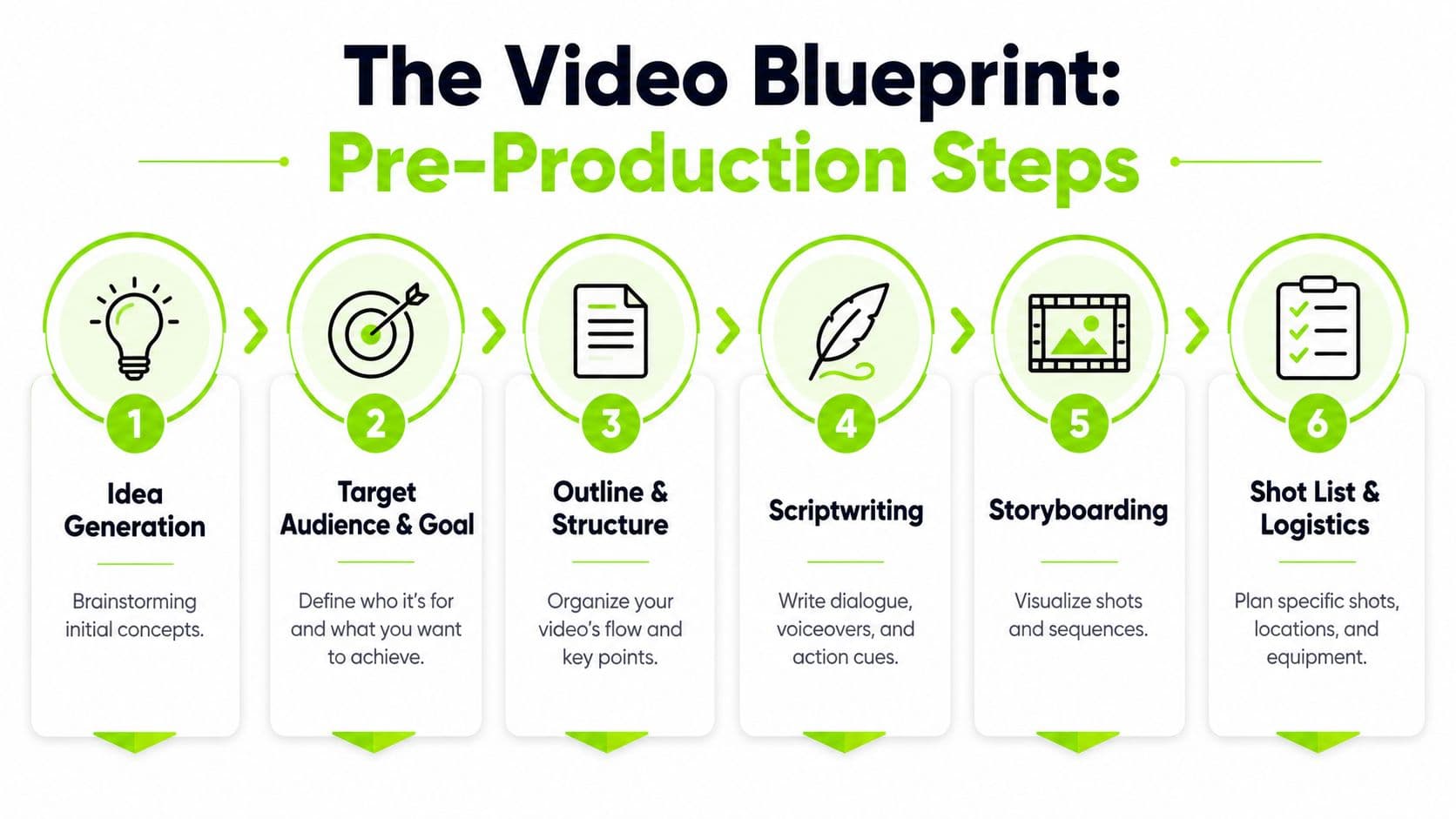
Creators love to “just start recording” because planning feels slow. In reality, planning is the fast route. A clean outline, a proper hook, and a simple shot list save you from rambling takes, missing footage, and painful edits later.
Start with the hook, not the intro
The first thing to write is not your greeting. It's your opening promise.
The first 10 seconds are the critical threshold for viewer retention, which is why your hook needs to immediately match what the viewer came for, as noted by Thrive Agency's guide to video production. So skip the throat-clearing. Nobody needs “Hey guys, welcome back.” They need a reason to stay.
Use this structure instead:
A simple example:
If you want stronger planning frameworks beyond scripting, these effective content strategies are worth reviewing because they force you to think about audience intent, not just topic selection.
You should also stop guessing what content is missing in your niche. A quick content gap analysis workflow helps you find what competitors skip, which gives your video a sharper angle before production even starts.
- Call out the problem
- Agitate it
- Promise the payoff
- Open a loop
- Move straight into value
- Problem: “Your videos still look amateur.”
- Agitate: “Not because your camera is bad, but because your process is sloppy.”
- Solve: “I'm going to show you the exact workflow that fixes that.”
- Open loop: “The biggest mistake happens before you press record.”
- Deliver.
Build a shot list that saves your edit
A shot list sounds boring until you're in post wishing you had one extra cutaway.
Keep it simple. One page is enough. Divide it into:
Don't script every sentence if that makes you stiff. Script the beats. Then list the visuals that make each beat easier to understand.
The planning mistake I see most often is creators collecting information but not designing flow. A house needs a blueprint. So does a video. If the viewer can't feel momentum in the first minute, the rest of your hard work won't matter.
- A-roll: your main talking points or voiceover sections
- B-roll: what the viewer should see while hearing that point
- Proof shots: screens, close-ups, examples, demos
- Transition shots: hand movement, desk setup, typing, room detail
Your Affordable Home Studio Setup
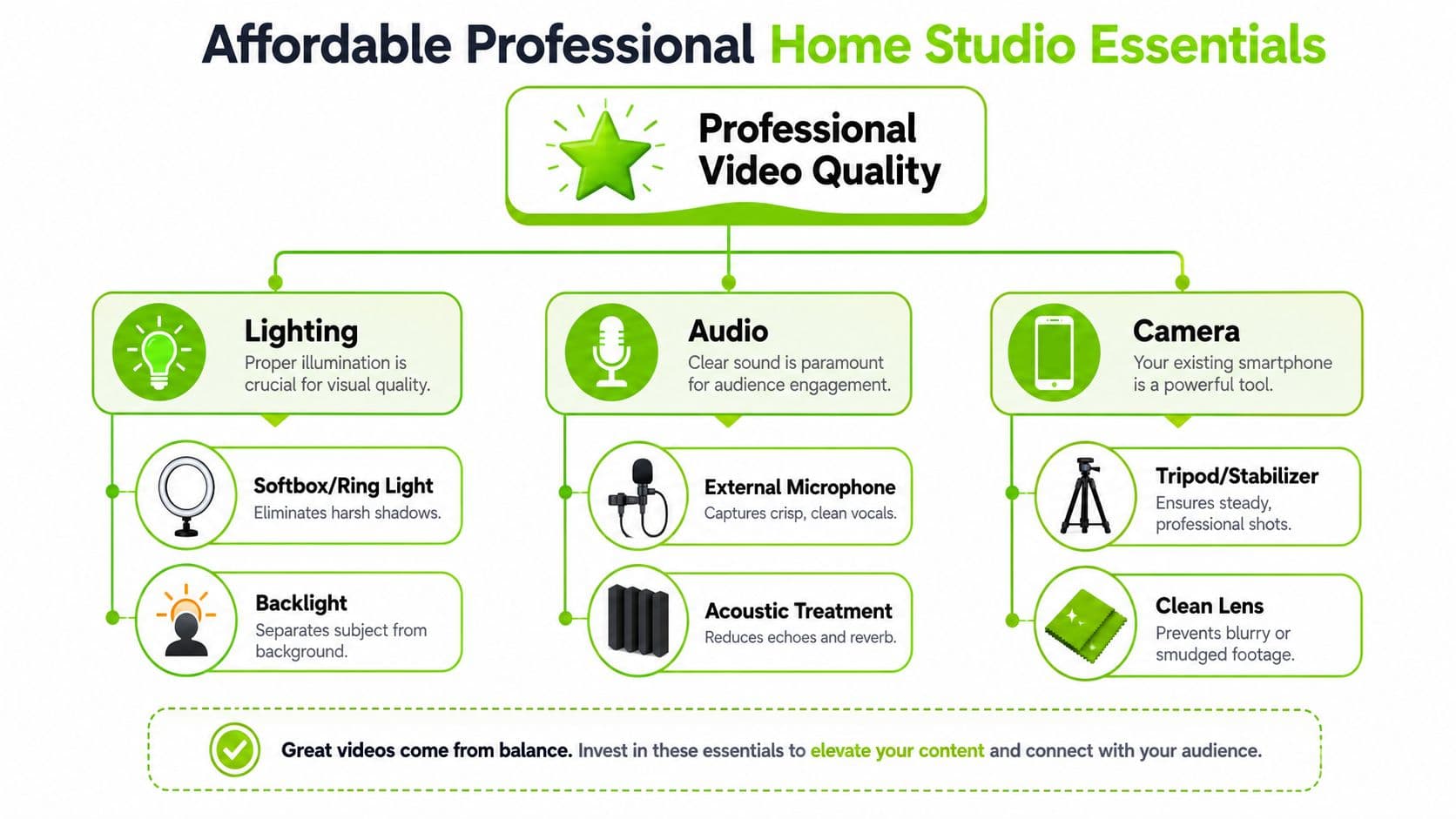
You do not need a fancy camera setup to make professional videos. You need controlled light, clear audio, and a stable frame.
That's it. Most creators waste money on the least important upgrade first. They buy a camera body, keep using a bad mic, record in a reflective room, and wonder why the result still feels cheap.
Stop overspending on the wrong gear
Audio is the first upgrade. Not the camera.
According to ASU's video production guidelines, 60% of amateur videos fail due to background noise or inconsistent levels, and workflows that prioritize high-quality lavalier or shotgun microphones achieve 35% higher engagement. That lines up with reality. People will tolerate decent visuals. They won't tolerate annoying sound.
Your baseline technical standard should also be clean and modern. For professional quality, use at least 1920x1080 resolution with 48kHz sample rate and 24-bit audio depth, with 4K (3840x2160) reserved for flagship content, as outlined in UNA's video production standards.
The smart starter kit
Here's the setup I'd recommend before touching any premium gear list:
If you want help choosing simple lighting without getting lost in gear forums, this guide to budget-friendly streaming lighting is a practical place to start.
For creators working from lightweight setups, browser tools matter too. A free video editor for Chromebook makes a lot more sense than building a complex local workflow if your goal is speed.
Clean sound and flattering light make viewers assume the rest of the video is credible.
You don't need a room full of equipment. You need a room where nothing distracts from the message.
- Use your smartphone first: A modern phone is more than capable of shooting clean footage when lighting is good.
- Buy an external mic: A lav mic or shotgun mic will improve perceived quality faster than a camera upgrade.
- Add soft lighting: One key light and one separation light will do more for your image than new glass.
- Lock the camera down: A tripod instantly removes the “casual chaos” look.
- Treat the room a little: Curtains, rugs, furniture, and soft surfaces help tame ugly echo.
Filming Techniques That Create Polish
Once your setup is handled, technique becomes the separator.
A lot of amateur footage looks off for a simple reason. The creator recorded whatever happened in front of the lens. Professional footage looks better because someone decided where the viewer should look, how long they should look, and what shot should come next.
Frame with intent
Start with composition. Use the rule of thirds so your subject isn't stuck dead center unless there's a reason for it. Put the eyes near the upper third line. Leave looking room if the subject faces slightly left or right. Give the background a little depth instead of pressing yourself flat against a wall.
Then respect angle changes. When shifting perspective between shots, professional creators change the angle by at least 45 degrees to avoid jarring edits and maintain continuity, according to Wave.video's professional video tips.
A simple decision table helps:
| Situation | Weak choice | Better choice |
|---|---|---|
| Talking head cut | Same framing twice | Change angle clearly |
| Product mention | Keep face on screen | Cut to close-up demo |
| Tutorial step | Wide shot only | Add screen capture or over-shoulder shot |
| Emotional point | Random zoom | Hold steady and tighten with purpose |
There's another timing rule worth following. Individual shots should generally stay longer than 5 seconds but not exceed 10 seconds, and the camera should remain completely steady for at least 10 seconds before panning or zooming, as recommended by Adorama's videography tips.
Shoot for the edit
B-roll is not decoration. It's problem-solving footage.
Use it to cover cuts, explain what you're saying, and reset viewer attention. If you're teaching, capture your screen, your hands, your setup, your notes, the product, and the result. If you're running a faceless format, add motion through crop changes, simulated camera movement, and layered visuals instead of static slides.
If you're trying to improve visual sharpness across exports and platforms, this breakdown of resolution scaling for creators helps you avoid soft-looking results after upload.
Good filming is less about “getting footage” and more about collecting editing options on purpose.
That's the shift. Don't just record the script. Record choices.
What are the common questions?
What is the short answer for How to Make Professional Videos: A Creator's 2026 Playbook?
Learn how to make professional videos for YouTube or TikTok with our complete 2026 guide. We cover planning, gear, editing, AI tools, and growth hacks.
What should creators do first?
Check click quality
Who is this guide for?
This guide is for YouTube creators, faceless channel operators, agencies, and teams using AI tools to improve video production and growth.
Action checklist
Apply this to your channel today.
- 1Check click quality
- 2Check the opening
- 3Check the first major dip
- 4Check the strongest section
- 5Apply one fix to the next video