
What is the quick answer?
Find the best video watermark remover for your workflow. Practical methods, AI tools, legal tips, and how Satura AI keeps your edits watermark-free.
Key takeaways
- Why Everyone Is Suddenly Searching for a Video Watermark Remover
- The Free and Fast Workarounds Worth Trying First
- Crop first, then decide if the loss is acceptable
- Blur or cover only when the scene can handle it
- Retime the clip when the watermark is intermittent
- How AI Watermark Removal Actually Works Under the Hood
Overview
The watermark-removal software market is projected to reach USD 520.5 million by 2025, growing at a 25.49% CAGR through 2033. That growth matters because creators aren't looking for a gimmick, they're looking for a workflow that cleans footage without wrecking the edit.
You're probably staring at a clip right now, noticing a logo in the corner, a stamped subtitle, or a trial export that suddenly turned into a branding billboard. The choice isn't just which tool to use, it's whether you should remove, hide, crop, retime, or avoid the watermark problem entirely.
Why Everyone Is Suddenly Searching for a Video Watermark Remover
Tuesday morning is when this problem usually shows up. You grab a useful clip, export it, and there's a logo sitting in the corner like it owns the frame. That's not a niche annoyance anymore, it's part of how modern creators work.
The demand is real because the workflow is real. People stitch together licensed footage, AI-generated shots, highlight clips, and social cutdowns, then discover the final assembly still carries someone else's branding. The watermark-removal software market is projected to hit USD 520.5 million by 2025 at a 25.49% CAGR through 2033, which is a loud signal that this has become a mainstream production issue, not a side quest. The same report ties that growth to more digital content creation and the need for pristine video and imagery in both personal and enterprise workflows. Industry report on watermark-removal software growth
The smart way to think about this is simple. A video watermark remover is one option, not the default answer. Sometimes the right move is to crop. Sometimes it's to blur. Sometimes it's to retime the clip so the watermark never lands in the final cut. And sometimes the better move is to start with a tool that doesn't stamp your export in the first place.
Practical rule: if you can solve the problem in 30 seconds with editing, don't burn time on AI cleanup.
If you're trying to avoid the mess from the start, a browser editor with clean exports is a better bet than a cleanup chase. Satura AI's no-watermark editor approach fits that mindset better than the usual patch-it-later workflow.
The Free and Fast Workarounds Worth Trying First
Most creators reach for AI too early. That's backwards. If the watermark sits in a dead corner, the fastest fix is often a boring edit move that preserves the rest of the frame and gets you back to work.
Crop first, then decide if the loss is acceptable
Cropping works when the watermark hugs an edge and the shot has enough extra frame to spare. You lose resolution and composition, which is the trade-off nobody likes to talk about, but it's still cleaner than smearing a logo across a busy background. On a vertical clip, this can be the difference between a usable export and a blurry mess.
Blur or cover only when the scene can handle it
Blur is the emergency brake, not the elegant solution. A badly placed blur box looks amateurish fast, especially on talking-head footage or anything with motion near the mark. A graphic cover works better when the background is already visually noisy, but if it drifts or distracts, you've just replaced one problem with another.
Retime the clip when the watermark is intermittent
If the mark only appears part of the time, trim around it. That's the cleanest fix because it removes the issue instead of disguising it. It only works when the watermark doesn't sit there for the full duration, which is why short social clips are easier to salvage than long exports.
A creator I'd trust on deadline would test all three on the same ten-second clip. The cropped version looked tighter but lost useful frame detail. The blurred version worked in a pinch but screamed “patched together.” The retimed version was the only one that felt native, because the watermark never made it into the final cut.
If your footage comes from a link instead of a file, the same logic still applies. Turning a video link into an editable clip is useful only if you're smart about whether you need removal at all.
How AI Watermark Removal Actually Works Under the Hood
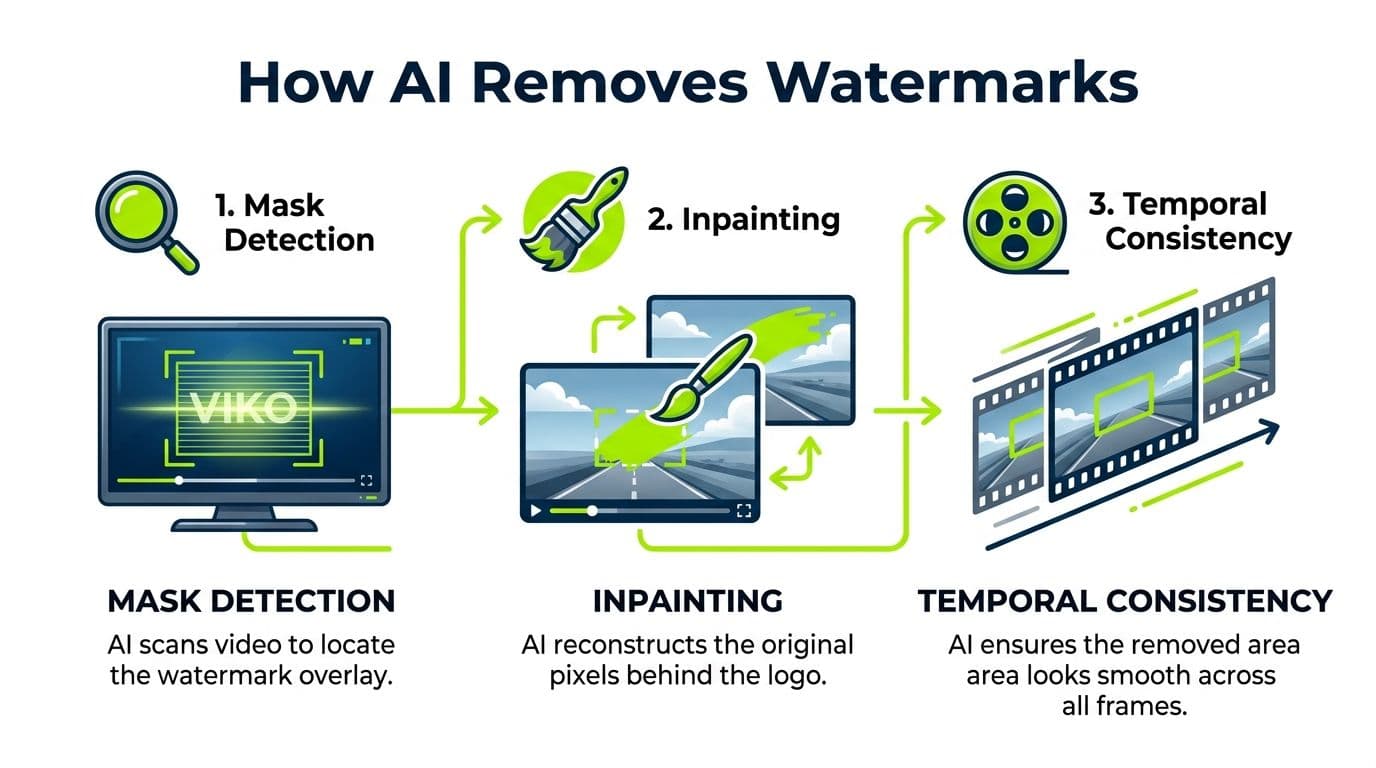
AI watermark removal is not magic. It's a pipeline, and if one stage fails, the whole result can look off. The best tools usually move through mask detection, inpainting, and temporal consistency in that order. AI object removal for photos is a good mental model for the first two stages, because the logic is similar even though video adds motion stress.
Mask detection finds the problem area
Mask detection is the locating step. The tool identifies where the watermark sits, either from a user-drawn selection or with a detector that spots logos, captions, or overlay text. If the mask is sloppy, everything downstream gets worse, because the AI starts repairing the wrong pixels.
Temporal consistency is what keeps the clip watchable
Temporal consistency is the part that matters most in motion. A frame that looks fine on its own can still flicker, jitter, or smear once the clip plays. That's why moving watermarks, semi-transparent logos, and marks crossing faces are so much harder than fixed corner stamps. If you only check one frame, you're not really checking the edit.
Check the mask on several adjacent frames, not just one. That's the difference between a passable frame and a usable video.
If you want a broader view of the editing stack around this kind of cleanup, AI tools for video editing are worth comparing before you commit to any one remover.
Running a Real Removal Job From Upload to Export
The workflow is usually more standardized than people expect. You upload a file or paste a video URL, mark the watermark, preview a short sample, then run the full job and export. That same basic flow shows up across tools like Media.io, Pixelbin, and similar browser-based removers, which is why the user experience feels so similar once you've tried a few. A Premiere Pro tutorial for creators can help if you'd rather handle the cleanup inside a broader edit instead of treating it as a standalone task.
The preview step is where most mistakes get caught
Do not skip the preview. It's the only fast way to see whether the selection is too wide, too narrow, or cutting into real content. Watch for edge artifacts, smeared subjects, and opacity shifts, because those flaws often show up only after the first few seconds have played.
If the preview looks bad, redraw the mask before you waste time on full processing. If the preview looks clean on a couple of frames but fails when motion starts, the selection is usually too aggressive or the scene is too complex for a one-pass repair. That's the moment to accept that a crop or retime would've been the smarter move.
Format support is usually broad enough for normal creator work. The Chrome Web Store listing for one remover supports MP4, MOV, and AVI, while Pixelbin lists MP4, WebM, and MOV. Video watermark remover browser workflow details and Pixelbin's import options show how common file and URL-based uploads have become, which matters when you're moving clips between platforms.
Operational rule: preview first, export second, and never trust a clean first frame.
What are the common questions?
What is the short answer for Video Watermark Remover: The Creator's Honest Guide?
Find the best video watermark remover for your workflow. Practical methods, AI tools, legal tips, and how Satura AI keeps your edits watermark-free.
What should creators do first?
Rights check: confirm you're allowed to alter the footage.
Who is this guide for?
This guide is for YouTube creators, faceless channel operators, agencies, and teams using AI tools to improve video production and growth.
Action checklist
Apply this to your channel today.
- 1Rights check: confirm you're allowed to alter the footage.
- 2Artifact scan: watch for smudges, jitter, or weird texture.
- 3Quality test: view the export on a larger screen.
- 4Source credit: decide whether attribution is needed or required.
- 5Workflow check: ask whether crop, blur, or retime would've been better.
- 6Clean export: only publish when the file still looks natural in motion.
Sources & methodology
- Satura editorial guide based on the source video, topic cluster, and article sections.
- Source video reviewed for this article: https://www.outrank.so/